

Team AI adoption: a practical guide for SMBs
May 22, 2026
Protecting confidential data AI workflows: 2026 guide
May 24, 2026
TL;DR:
- Knowledge base AI relies on Retrieval-Augmented Generation to provide accurate answers grounded in company documents. Proper implementation, including content governance and iterative development, is crucial for reliable results and regulatory compliance. SMBs should start small, own their data, and continuously update content to maximize efficiency improvements.
Many business leaders first encounter knowledge base AI when a vendor promises it will answer every customer question automatically, and then discover the reality is messier. The AI gives confident but wrong answers, fails to find company-specific policies, or simply ignores documents you uploaded weeks ago. These failures are common, and they usually come down to poor implementation rather than the technology itself. This article explains how knowledge base AI actually works, what it takes to build one that delivers reliable results, and how SMBs can adopt it without the headaches that trip up most first attempts.
Table of Contents
- Key takeaways
- What knowledge base AI actually is
- Building your AI knowledge base step by step
- Security, compliance, and data governance
- Real-world use cases and realistic expectations
- My honest take on knowledge base AI for SMBs
- How Done can help you build it right
- FAQ
Key takeaways
| Point | Details |
|---|---|
| RAG is the foundation | Retrieval-Augmented Generation grounds AI answers in your actual company documents, reducing hallucinations significantly. |
| Start small and iterate | Begin with your ten most common questions, test retrieval accuracy, then expand based on real gaps. |
| Governance is non-negotiable | Assign content owners, establish update cycles, and maintain audit trails to keep answers trustworthy over time. |
| Compliance matters in Luxembourg | Self-hosted or EU-residency deployments keep data within regulatory boundaries and satisfy GDPR requirements. |
| Realistic ROI beats vendor promises | Measure your own ticket volumes and resolution times before and after deployment rather than relying on marketing claims. |
What knowledge base AI actually is
A knowledge base AI is not a chatbot connected to a search bar. It is a system that converts your existing company documents, policies, product manuals, and support articles into a searchable, conversational interface that retrieves precise answers grounded in your own content.
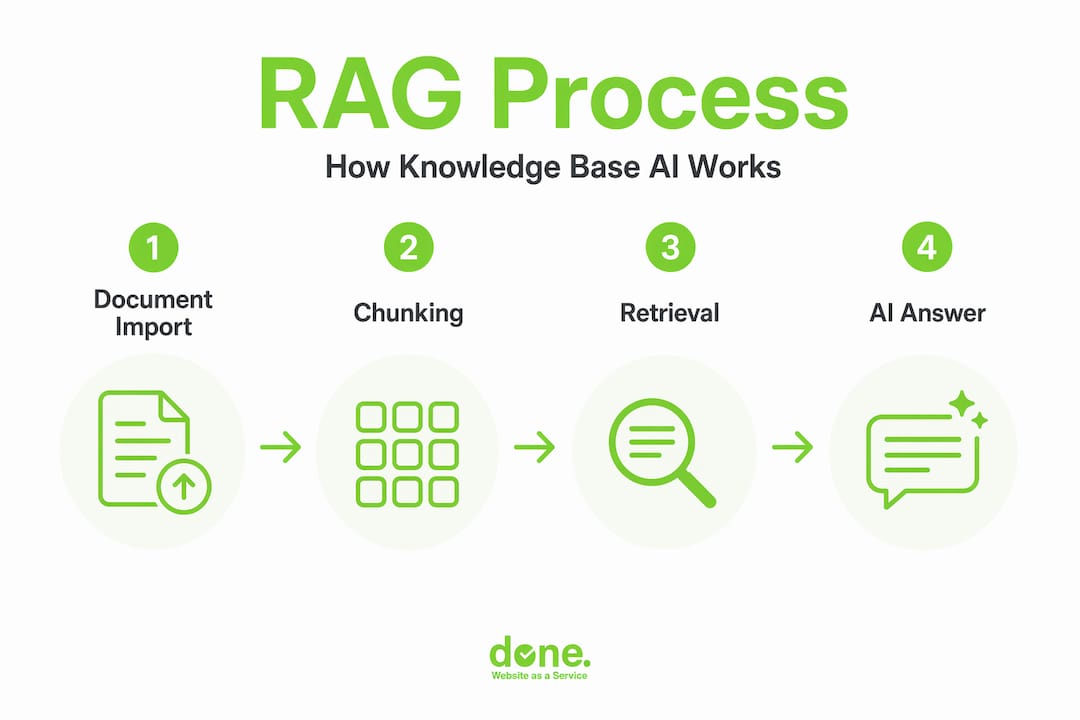
The core technology behind most modern implementations is called Retrieval-Augmented Generation, or RAG. Rather than relying entirely on what a large language model (LLM) learned during training, RAG retrieves relevant documents in real time and passes them to the AI as context before generating an answer. The result is responses that cite your actual policies rather than generalised assumptions. This is what separates knowledge base AI from a standard chatbot.
How retrieval and chunking work
Documents are not fed into the system whole. They are split into smaller segments called chunks, each representing a logical unit of meaning, such as a paragraph or a section. Each chunk is converted into a numerical representation called a vector embedding, which captures its semantic meaning. When a user asks a question, the system converts that question into a vector as well, then finds the chunks with the closest semantic match.
The accuracy of this process depends heavily on how well the chunks are constructed. Poorly defined chunks, say a paragraph cut mid-sentence or a section with no context, produce weak matches. Well-designed chunks include surrounding context and metadata such as document title, date, and category. This metadata-enriched approach is often called contextual retrieval, and it meaningfully reduces the number of irrelevant or incomplete answers.

Access control and the difference from agent memory
One point that often confuses decision-makers: a knowledge base AI is not the same as an AI that “learns” from conversations. Source-level permissions align retrieval with your existing organisational access rights, meaning a customer service agent sees only what their role permits, and a customer sees only public-facing content. This happens automatically at retrieval time.
The knowledge base itself is a shared, governed library of company context. It is not a personalised memory for individual users or agents. Think of it as the official record. Agent memory is a separate concept, useful for personalising individual interactions, but not a replacement for a well-maintained artificial intelligence knowledge repository that the whole organisation relies on.
Pro Tip: When scoping your knowledge base AI, map your content by audience first. Separate what is internal from what is customer-facing before you touch any technical setup. Getting this wrong at the start means rebuilding your access control structure later.
Building your AI knowledge base step by step
The most common mistake SMBs make is trying to upload everything at once and expecting the system to sort it out. It does not. Retrieval quality depends directly on how well your content is prepared, structured, and maintained.
Here is a practical sequence that we have found works reliably with clients:
-
Identify your top ten questions. Start with the queries that arrive most frequently in your support inbox or that take your team the longest to answer. These become your first content targets. Treating the knowledge base as an evolving asset rather than a one-time build is the most important mindset shift.
-
Clean and segment your source documents. Remove outdated versions, merge duplicates, and break documents into logical units. Each chunk should answer one question or cover one topic. Avoid chunks that span multiple unrelated subjects.
-
Write for retrieval, not for reading. Documents written for human readers often bury the key fact in paragraph three. For AI retrieval, put the answer first. Rewrite FAQ articles so the question and answer appear together clearly.
-
Index with a vector database using hybrid search. Hybrid keyword and semantic search approaches yield faster and more relevant retrieval than either method alone. For scaling, apply quantization and appropriate indexing methods such as HNSW or IVF to maintain speed as your document library grows.
-
Connect your existing systems. An AI knowledge management tool that pulls from documents, HR records, project archives, and communication threads through a single interface delivers far broader coverage than one fed only from a manually uploaded folder.
-
Test retrieval before going live. Run your top ten questions through the system and evaluate whether the answers are accurate, sourced from the right documents, and consistent. Fix gaps before users encounter them.
-
Build a feedback loop. Query logs tell you what users are asking that the system cannot answer well. Review these weekly in the first month and use them to identify content gaps, not system failures.
Governance: the piece most SMBs skip
Even a well-built knowledge base degrades over time without active governance. Policies change, products are updated, and regulations shift. Flagging stale content, version control, and dedicated content owners prevent what practitioners call “knowledge rot,” where the AI continues confidently answering questions based on information that is no longer accurate.
| Governance element | What it involves | Why it matters |
|---|---|---|
| Content ownership | Assign one responsible person per topic area | Prevents gaps and ensures accountability |
| Update cadence | Schedule quarterly reviews at minimum | Keeps answers aligned with current policies |
| Version control | Track document changes with timestamps | Enables accurate audit trails |
| Retrieval quality audits | Review low-confidence answers monthly | Identifies chunks that need rewriting or expansion |
Pro Tip: Treat your knowledge base like a product, not a project. Projects end. Products need owners, release cycles, and ongoing investment. Without this framing, most knowledge bases become unreliable within six months.
Security, compliance, and data governance
For SMBs in Luxembourg and across Europe, GDPR compliance is not optional, and data residency is a genuine operational concern. The good news is that modern automated knowledge systems are built with these requirements in mind, provided you choose and configure them correctly.
The most critical security feature in any RAG-based system is permission enforcement at retrieval time. This means the system checks a user’s access rights before surfacing any document, not just at login. Source-level permissions prevent a customer from seeing internal pricing notes or a junior employee from accessing confidential HR records, even if those documents sit in the same vector database.
Beyond access control, there are four compliance considerations that matter most for regulated industries:
- Data residency. Where is your data stored and processed? Self-hosted deployments ensure data does not leave your infrastructure, which is essential for legal, financial, and healthcare firms operating under strict data sovereignty rules. Done specialises in exactly this kind of private, on-premise AI deployment.
- Audit trails. Every query and every retrieved document should be logged. This supports both GDPR accountability requirements and internal quality assurance.
- Knowledge versioning. Version histories enable responses to reference the correct point-in-time policy, which matters when a client dispute references guidance given six months ago.
- Stale content detection. Automated flags for documents that have not been reviewed within a defined period reduce the risk of outdated guidance reaching customers or staff.
A knowledge base AI is only as trustworthy as the governance structure behind it. The technology is reliable when configured correctly. The human process of keeping content accurate and current is where most implementations succeed or fail.
For SMBs without a dedicated IT security team, the safest approach is to work with a partner who can configure access controls, set up audit logging, and recommend an infrastructure model that matches your regulatory context from the start, rather than retrofitting compliance after launch.
Real-world use cases and realistic expectations
The benefits of knowledge base AI are genuine, but the numbers you see in vendor marketing deserve scrutiny. Claims of 60 to 70 percent ticket volume reduction in the first month are common, but outcomes vary significantly depending on content quality, integration depth, and user adoption. Measure your own baseline first.
Here is how the impact typically breaks down across two of the most common use cases:
| Use case | What the AI handles | What still needs a human |
|---|---|---|
| Customer support | Common policy questions, product FAQs, order status queries | Complaints, edge cases, emotionally sensitive situations |
| Internal staff support | HR policies, IT procedures, onboarding documents | Judgement calls, exceptions, escalations |
| Sales enablement | Product specs, pricing tiers, competitor comparison docs | Negotiation, relationship management, contract sign-off |
| Compliance queries | Regulatory summaries, internal procedures | Legal interpretation, formal advice |
The most consistent gains we have seen across SMB deployments are not dramatic ticket reductions but rather faster resolution times and reduced load on senior staff. When a new employee can get an accurate answer to an HR question in thirty seconds instead of waiting for a colleague, that is a real and measurable efficiency gain. Multiply that across a team of twenty people and a working week, and the hours recovered are substantial.
Integrations determine adoption rates. A knowledge base that connects existing data sources across your tools, rather than sitting as a separate portal everyone must remember to visit, gets used. One that requires a new login and a context switch gets ignored. You can read more about how AI improves customer service outcomes in practice if you are exploring the support angle specifically.
Common pitfalls worth avoiding:
- Uploading unreviewed documents and assuming the AI will filter poor quality content. It will not.
- Treating the launch as the finish line. Adoption and content quality improve over the first three to six months of active management.
- Ignoring frontline users. Designing for broad workforce access, including mobile and without VPN dependency, dramatically improves usage rates compared to traditional intranet-style deployments.
- Skipping evaluation metrics. Define what success looks like before you start: resolution rate, escalation rate, query volume, or user satisfaction scores.
My honest take on knowledge base AI for SMBs
I have worked on a number of knowledge base AI projects with SMBs in Luxembourg, and the pattern I see most often is this: businesses invest in the technology, neglect the process, and then blame the AI when it underperforms.
The technology is not the hard part anymore. What is hard is convincing a team to take content ownership seriously, to update a policy article the week it changes rather than six months later, and to review query logs regularly instead of assuming the system is handling things. In my experience, the difference between a knowledge base that earns trust and one that gets quietly abandoned comes down almost entirely to this ongoing curation discipline.
I have also seen businesses chase a “perfect” knowledge library before going live, spending months organising and cleaning every document they own. This is almost always the wrong approach. Start with the ten documents that answer the questions your team gets asked every day. Get those right. Measure retrieval accuracy. Then expand. The iterative approach consistently outperforms the big-bang launch.
On the compliance side, I feel strongly that SMBs in regulated sectors should not accept a cloud-hosted AI that processes sensitive data on third-party infrastructure without understanding exactly where that data goes and who can access it. The option to run a knowledge base AI on private infrastructure exists and is not significantly more expensive than cloud alternatives when you factor in the risk reduction. This is a conversation worth having before you sign any contract.
My final word: own your data, start small, assign a real content owner, and measure the actual impact on your team’s time. Everything else is detail.
— Thomas
How Done can help you build it right
If you are evaluating knowledge base AI for your business, the implementation decisions you make in the first few weeks determine whether the system becomes a trusted tool or a frustration. Done works with SMBs across Luxembourg and Europe to design, build, and govern AI knowledge systems that are GDPR-compliant, practically useful, and aligned with how your teams actually work.

Our AI consulting for SMBs covers everything from initial audit and content architecture through to technical deployment and staff training. We have delivered projects with private infrastructure options for data-sensitive sectors, multilingual support for Luxembourg’s cross-border business environment, and governance frameworks that keep knowledge bases accurate over time. If you want a structured approach to AI adoption rather than a rushed implementation, our AI strategy roadmap is a practical starting point. Get in touch to discuss what a knowledge base AI could realistically do for your operation.
FAQ
What is knowledge base AI?
Knowledge base AI is a system that connects an AI language model to your company’s own documents and policies, allowing it to retrieve and answer questions based on your specific content rather than general training data.
How does RAG reduce AI hallucinations?
Retrieval-Augmented Generation grounds answers in retrieved document chunks from your knowledge base rather than relying solely on the AI’s training. This means responses are tied to real source material, which significantly reduces the risk of invented or inaccurate answers.
How long does it take to implement an AI knowledge base?
A focused initial deployment covering your top ten to twenty use cases can be operational within four to eight weeks. Full-scale deployment with integrations, governance, and staff training typically takes three to four months.
Is a knowledge base AI GDPR-compliant?
It can be, provided you configure access controls correctly, log queries for audit purposes, and choose infrastructure that keeps data within EU boundaries. Self-hosted deployments offer the strongest data residency guarantees for regulated industries.
What is the realistic ROI for an SMB?
Rather than relying on vendor claims of large ticket volume reductions, measure your own resolution times and escalation rates before and after deployment. Most SMBs see meaningful time savings for both support staff and employees looking up internal information, with improvements becoming clearer after the first few months of active content management.