

Ecommerce branding strategies that drive 23% more sales
March 30, 2026You’ve built a solid business, and now you’re ready to take it online. But as you sit down to plan your e-commerce launch, the sheer volume of decisions feels overwhelming. Which platform should you choose? How do you ensure your checkout works flawlessly? What about GDPR compliance, payment gateways, and SEO? One misstep can cost you customers, revenue, and credibility. This guide walks you through every critical stage of launching your e-commerce site, from initial planning to post-launch optimisation, with practical advice tailored for European SMEs ready to grow online.
Table of Contents
- Assess your e-commerce goals and requirements
- Choose the right technology and platform
- Design, content, and user experience essentials
- Set up your technical essentials: payments, shipping, and security
- Craft your digital launch plan
- Pre-launch, live launch, and post-launch checklist
- Launch your e-commerce site with expert support
- Frequently asked questions
Key Takeaways
| Point | Details |
|---|---|
| Clear goals first | Define your business goals and requirements before you start building. |
| Pick the right platform | Choose a scalable, compliant platform that matches your technical skills and growth plans. |
| Focus on user experience | Design for ease of use, fast checkout, and effective persuasion to convert visitors. |
| Test thoroughly | Double-check payments, GDPR, and core flows before and after going live. |
| Have a launch plan | Your marketing efforts should start before your site is public and accelerate after launch. |
Assess your e-commerce goals and requirements
Now that we’ve previewed the journey, let’s begin by laying the right foundation. Before you select a platform or hire a designer, you need absolute clarity on what you want your e-commerce site to achieve. Too many business owners jump straight into build mode without defining success, and they end up with a site that looks good but doesn’t deliver results.
Start by identifying your primary business objectives. Are you focused on direct sales, lead generation, or building brand awareness? Each goal demands different features and priorities. Next, articulate your unique value proposition. What makes your products or services different from competitors? Who is your ideal customer, and what problems do they need solved? Write this down in plain language.
Once you’ve clarified your strategy, list the technical features your site must have. Consider payment methods your customers prefer, shipping options for your target markets, multi-language support if you serve diverse regions, and any integrations with inventory or CRM systems. Defining goals is crucial for business growth, and early clarity prevents costly edits or pivots after launch.
Set realistic success metrics for your launch. These might include conversion rates, average order value, traffic sources, or customer acquisition cost. Tracking these from day one helps you measure progress and make data-driven improvements.
Pro Tip: Document your requirements in a simple spreadsheet or checklist. Share it with your development team or agency to ensure everyone works towards the same vision. A clear website creation checklist keeps your project on track and prevents scope creep.
Choose the right technology and platform
With a clear strategy, you’re ready to select the technology that fits your vision. The e-commerce platform you choose will influence everything from your site’s scalability to its design flexibility, so this decision deserves careful consideration.
You’ll encounter two main categories: hosted solutions and self-hosted platforms. Hosted solutions like Shopify or BigCommerce handle hosting, security, and updates for you. They’re quick to launch, require minimal technical knowledge, and offer reliable support. However, they come with monthly fees, limited customisation, and potential transaction charges.
Self-hosted platforms like WooCommerce (built on WordPress) or Magento give you complete control over design, functionality, and data. You can customise every element and avoid transaction fees. The trade-off is that you’re responsible for hosting, security, updates, and technical maintenance. Custom-built solutions offer maximum flexibility but require significant investment and ongoing development resources.
| Platform type | Best for | Pros | Cons |
|---|---|---|---|
| Hosted (Shopify, BigCommerce) | Quick launches, non-technical owners | Easy setup, reliable support, automatic updates | Monthly fees, limited customisation, transaction charges |
| Self-hosted (WooCommerce, Magento) | Businesses wanting control | Full customisation, no transaction fees, data ownership | Requires technical knowledge, ongoing maintenance |
| Custom build | Unique requirements, large catalogues | Unlimited flexibility, tailored features | High cost, longer development time |
When evaluating platforms, factor in European-specific needs. Does the platform support GDPR compliance tools? Can it handle multiple currencies and VAT rates across EU countries? What payment gateways does it integrate with, and are they popular in your target markets? Consider local delivery partners and their API availability.
The right platform influences scalability, integration, and design. Choose one that can grow with your business rather than forcing you to migrate later.
Pro Tip: Test the checkout process on demo sites before committing. The smoothness of the customer journey matters more than backend features. If you’re unsure which platform fits your needs, consult with specialists who can build an e-commerce website tailored to your business model.
Design, content, and user experience essentials
After choosing the right platform, it’s time to build a user experience that turns visitors into customers. Your site’s design and content directly impact trust, engagement, and conversion rates. Get this wrong, and even the best products won’t sell.

Start with a mobile-first responsive design. Over 60% of e-commerce traffic now comes from mobile devices, so your site must look perfect and function flawlessly on smartphones and tablets. Test every page, button, and form on multiple screen sizes before launch.
Your product descriptions need to do more than list features. Write compelling copy that addresses customer pain points, highlights benefits, and includes clear calls to action. Use high-quality images from multiple angles, and consider adding video demonstrations for complex products.
Navigation should be intuitive and logical. Organise products into clear categories, implement a robust search function, and ensure customers can find what they need in three clicks or fewer. Navigability and high-quality design directly influence conversions.
Speed matters enormously. A one-second delay in page load time can reduce conversions by 7%. Optimise images, enable caching, use a content delivery network, and minimise unnecessary scripts. Run regular speed tests and address any issues immediately.
Accessibility isn’t optional. Ensure your site meets WCAG standards by providing alt text for images, maintaining sufficient colour contrast, enabling keyboard navigation, and structuring content with proper headings. Accessible sites serve more customers and often rank better in search results.
- Design a clean, distraction-free checkout process with progress indicators
- Display trust signals prominently (security badges, customer reviews, return policies)
- Offer guest checkout alongside account creation options
- Show clear shipping costs and delivery estimates early in the process
- Provide multiple contact methods for customer support
Pro Tip: Conduct a UX audit before launch. Ask friends or colleagues unfamiliar with your business to complete a purchase while you observe. Their struggles reveal friction points you’ve become blind to. Professional web design for ecommerce success incorporates user testing at every stage, and a thorough website design checklist ensures nothing gets overlooked.
Set up your technical essentials: payments, shipping, and security
Once the design and content are ready, you must handle the technical nuts and bolts for smooth operation. These backend systems might be invisible to customers, but they’re critical for trust, compliance, and successful transactions.
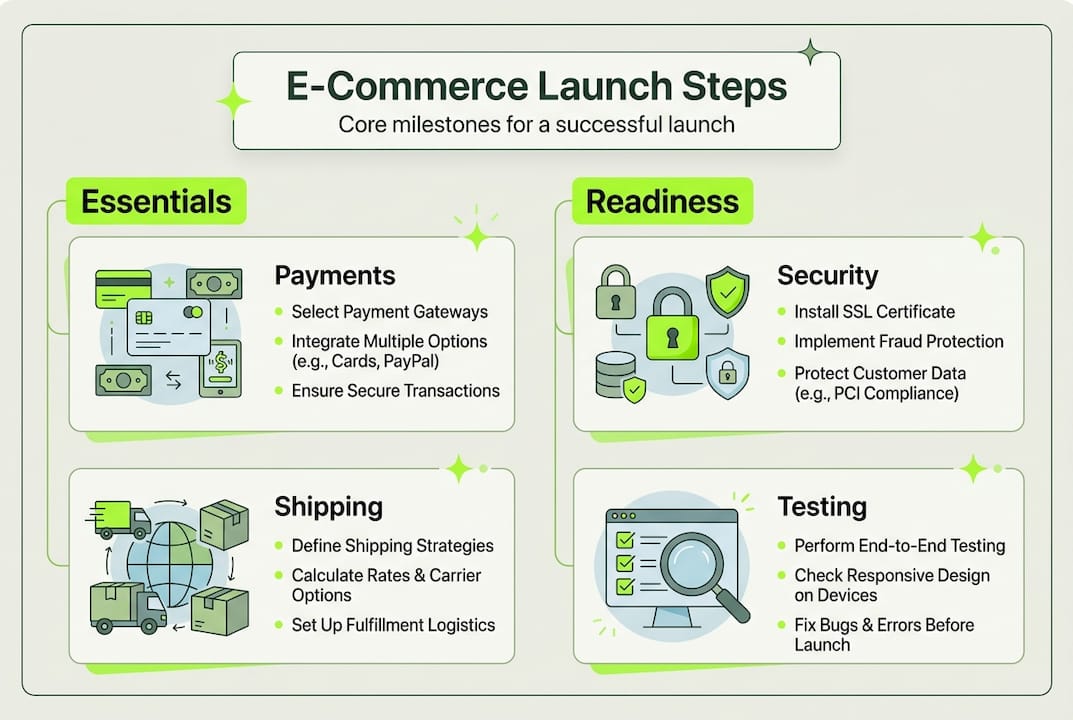
Payment processing is your first priority. European customers expect multiple payment options, so integrate at least three methods. PayPal and Stripe are standard, but also consider SEPA direct debit for recurring payments, Klarna for buy-now-pay-later options, and local favourites like iDEAL in the Netherlands or Bancontact in Belgium. Each payment gateway has different fee structures, settlement times, and integration complexity, so research thoroughly.
Configure your tax settings correctly from the start. EU VAT rules are complex, with different rates across countries and special rules for digital goods. Your platform should automatically calculate the correct VAT based on the customer’s location. If you’re selling across borders, register for VAT MOSS (Mini One Stop Shop) to simplify reporting.
Shipping configuration requires careful planning. Set up multiple shipping zones with accurate rates for each EU country you serve. Offer at least two delivery speeds (standard and express), and consider free shipping thresholds to increase average order values. Integrate with shipping carriers’ APIs for real-time tracking and automated label generation.
| Security essential | Purpose | Implementation |
|---|---|---|
| SSL certificate | Encrypts data between customer and server | Required for all e-commerce sites; obtain from hosting provider |
| GDPR compliance | Protects customer data and privacy | Cookie consent, privacy policy, data processing agreements |
| PCI DSS compliance | Secures payment card data | Use certified payment gateways; never store card details |
| Regular backups | Protects against data loss | Automated daily backups stored off-site |
Security lapses cause loss of trust and sales. Implement SSL certificates immediately so your site displays the padlock icon in browsers. Create comprehensive privacy policies and cookie consent mechanisms that comply with GDPR. Never store payment card details on your server; let your payment gateway handle that responsibility.
Even one payment error can lose you a customer for life.
Test every step of the purchase journey multiple times before launch. Place test orders using different payment methods, shipping addresses, and device types. Verify that confirmation emails arrive promptly with correct information. Check that orders appear properly in your admin panel and that inventory updates automatically.
When you build an e-commerce site for business, these technical foundations determine whether customers complete purchases or abandon their carts in frustration.
Craft your digital launch plan
With your site ready, you need a plan to get it seen by the right people from day one. A coordinated digital marketing strategy ensures your launch generates momentum rather than launching into silence.
Search engine optimisation must begin before launch, not after. Conduct keyword research to identify terms your customers actually search for. Optimise product titles, descriptions, and meta tags with these keywords. Create unique, valuable content for category pages rather than generic text. Set up proper URL structures, implement schema markup for products, and submit your sitemap to Google Search Console. SEO in ecommerce success requires early integration to be effective.
Build anticipation on social media in the weeks before launch. Share behind-the-scenes content, product teasers, and countdown posts. Engage with your audience through polls, questions, and sneak peeks. Consider partnering with micro-influencers in your niche who can authentically promote your launch to their engaged followers. Social media for e-commerce extends your reach and builds community around your brand.
Email marketing delivers exceptional ROI for e-commerce launches. If you have an existing contact list, design a launch sequence that builds excitement and drives traffic. Send a teaser email one week before launch, a launch announcement on day one, and follow-up emails highlighting specific products or special offers. Segment your list based on customer interests for more targeted messaging.
- Set up Google Analytics and e-commerce tracking before launch
- Create retargeting pixels for Facebook and Google Ads
- Prepare paid advertising campaigns to drive immediate traffic
- Schedule social media posts for launch week
- Brief your customer service team on common questions and processes
Digital marketing lifts online revenue by up to 30% for European SMEs. A coordinated marketing move delivers more traffic and better launch ROI. Don’t rely on organic discovery alone; invest in targeted paid advertising to jumpstart your visibility.
Consider offering a launch promotion to incentivise early purchases. Limited-time discounts, free shipping, or bonus products create urgency and encourage customers to buy now rather than later. Just ensure your margins can support the promotion and that you have sufficient inventory to fulfil orders.
Pre-launch, live launch, and post-launch checklist
After the groundwork and promotion come the essential checks that protect your investment and build trust. A systematic approach to testing and monitoring prevents embarrassing errors and ensures a smooth customer experience.
Your pre-launch testing phase should be exhaustive. Test your site on multiple devices (iPhone, Android, tablets, desktops) and browsers (Chrome, Safari, Firefox, Edge). Complete the entire checkout process multiple times using different payment methods and shipping addresses. Verify that all forms work correctly, confirmation emails arrive promptly with accurate information, and order data appears properly in your admin panel.
Check every link on your site to ensure none lead to 404 errors. Review all product images, descriptions, and prices for accuracy. Test your site’s speed using tools like Google PageSpeed Insights and address any issues that slow loading times. Verify that your SSL certificate is properly installed and that your site displays the secure padlock icon.
- Conduct final mobile responsiveness checks across devices
- Test checkout process with real payment methods (then refund)
- Verify all forms, emails, and automated notifications
- Run speed tests and optimise any slow-loading pages
- Double-check product information, pricing, and inventory levels
- Confirm shipping rates calculate correctly for all zones
- Test customer account creation and password reset functions
- Review privacy policy, terms of service, and GDPR compliance
When you go live, monitor everything closely for the first 48 hours. Watch your analytics for traffic patterns, bounce rates, and conversion data. Check error logs for technical issues. Read through customer enquiries to identify common questions or confusion points. Be prepared to make quick adjustments based on real user behaviour.
| Post-launch priority | Action | Timeline |
|---|---|---|
| Monitor analytics | Check traffic, conversions, bounce rates daily | First week |
| Customer feedback | Respond to all enquiries within 4 hours | Ongoing |
| Technical issues | Review error logs and fix problems immediately | Daily |
| Marketing performance | Analyse ad performance and adjust targeting | Weekly |
| Inventory management | Track stock levels and reorder as needed | Daily |
Follow up with your first customers personally. Send thank-you emails, request feedback, and address any concerns immediately. These early customers are your most valuable advocates if you treat them exceptionally well.
Pro Tip: A successful launch is never the end; plan updates based on real data. Schedule a post-launch review two weeks after going live to analyse what’s working and what needs improvement. Thorough launch testing prevents costly errors, and ongoing optimisation based on customer behaviour ensures your site continues improving. Use comprehensive checklists for new ecommerce sites to ensure nothing falls through the cracks.
Launch your e-commerce site with expert support
Launching an e-commerce site involves dozens of moving parts, from technical configuration to marketing strategy. While this guide provides the roadmap, executing it successfully requires expertise, time, and attention to detail that many business owners simply don’t have.

At Done.lu, we’ve helped over 150 European SMEs launch successful e-commerce sites that generate real revenue from day one. Our team handles everything from platform selection and design to GDPR compliance and digital marketing strategy, so you can focus on running your business. We use Growth Driven Design methodology to launch quickly, then continuously optimise based on real customer data. Whether you need a complete e-commerce solution or expert guidance on specific challenges, we’re here to ensure your online launch succeeds. Ready to take your business online with confidence? Let’s talk about your e-commerce goals and create a launch plan tailored to your needs.
Frequently asked questions
How long does it take to launch an e-commerce site?
With proper planning and the right provider, you can launch in 2 to 6 weeks depending on complexity. A detailed checklist can streamline project timelines significantly.
What are the biggest mistakes to avoid when launching?
Skipping user testing, neglecting SEO, and misconfigured payments are the most common errors. SEO must be integrated early to be effective.
Which payment methods should my site offer in Europe?
Offer cards, PayPal, and regionally popular options such as SEPA transfers and Klarna for best conversion. The right payment options improve checkout conversion rates.
Do I need to comply with GDPR for an e-commerce site?
Yes, all European e-commerce sites must be GDPR compliant before launch. GDPR is a legal requirement for European businesses online.
Should I hire an agency or build my e-commerce site myself?
It depends on your technical skills, time availability, and budget. Agencies deliver faster launches with professional results, while DIY approaches save money but require significant learning and effort.