

AI data privacy: a practical guide for SME leaders
May 30, 2026
Web design trends 2026: what you need to know
June 1, 2026
TL;DR:
- Running AI locally without relying on cloud services is now feasible for small and medium-sized businesses seeking enhanced data privacy and operational control. Tools like Ollama and LM Studio enable deployment on standard hardware, with benefits including GDPR compliance and faster response times, often reaching cost savings within a year. Most SMBs should start with small models, ensure proper security measures, and guide their integrations with a focused, incremental approach.
Running AI without cloud dependency is no longer a niche concern for defence contractors or healthcare giants. It is a real, achievable option for small and medium-sized businesses that want to use AI tools without sending sensitive data to third-party servers. The term you will often encounter in technical circles is local AI inference, sometimes called on-premises AI. Both describe the same core idea: the AI model runs entirely on hardware you control, with no data leaving your network. This guide covers how it works, which tools to use, what it costs, and how to get started.
Table of Contents
- Key takeaways
- How AI runs without cloud: the technology explained
- Comparing tools: Ollama and LM Studio
- Data privacy and GDPR compliance
- Cost and operational considerations for SMBs
- Getting started: a step-by-step approach
- My perspective after working with SMBs on local AI
- How Done supports SMBs with local AI deployment
- FAQ
Key takeaways
| Point | Details |
|---|---|
| Local AI is production-ready | Tools like Ollama and LM Studio let SMBs run capable language models on standard hardware today. |
| GDPR compliance is easier on-premises | Keeping data on your own infrastructure removes the risk of third-party data processing and simplifies audit trails. |
| Hardware investment pays off within a year | On-premises AI typically reaches breakeven within 6 to 12 months compared with equivalent cloud API costs at scale. |
| You do not need air-gap strictness | Most SMBs benefit from a practical isolation tier, not a full air-gapped deployment. |
| Hybrid approaches work well | Pairing local models for routine tasks with cloud models for complex reasoning balances cost, privacy, and capability. |
How AI runs without cloud: the technology explained
Most people associate AI with massive data centres and constant internet connectivity. The reality is more flexible. What determines whether AI needs the cloud is the inference step: the moment the model processes your input and produces a response. Training a model does require enormous resources. Running one does not, at least not for modern, optimised open-weight models.
Cloud AI versus local AI inference
With cloud AI (think OpenAI’s API or Google Gemini), your prompt travels to an external server, is processed there, and the response comes back to you. The model never touches your machine. With local AI inference, the model weights are downloaded and stored on your hardware, and all processing happens there. Your data never leaves your network.
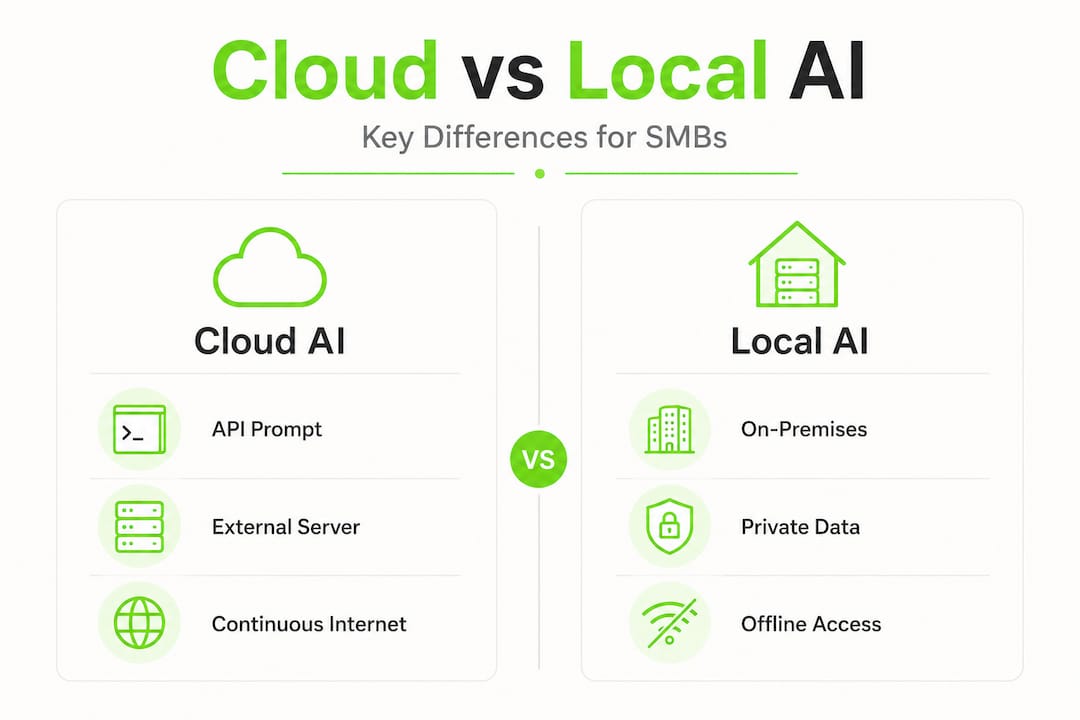
Edge AI is a specific variant of this concept. It refers to AI running on devices at the edge of a network, such as a manufacturing sensor, a reception kiosk, or a laptop without a reliable internet connection. On-premises AI typically refers to a server or workstation within your office or private data centre. Both are forms of AI without internet dependency, but at different scales.
Hardware requirements
The hardware question depends on which model you want to run and how fast you need responses:
- GPU acceleration: A modern NVIDIA GPU (RTX 3060 or better) can run 7-billion-parameter models comfortably. A 24GB GPU like the RTX 3090 handles 13B to 34B models without issue.
- CPU-only inference: Possible for smaller models (3B to 7B parameters) using frameworks like llama.cpp. Slower, but sufficient for many SMB use cases.
- Dedicated AI appliances: Products from vendors like Dell and others now ship purpose-built on-premises AI hardware. These are worth considering once your use case is validated.
Popular open-source models and engines
The most widely used local model formats are GGUF files (optimised for CPU and GPU inference via llama.cpp) and those served through Ollama or LM Studio. Models like Llama 3, Mistral, Phi-3, and Gemma 2 are all openly available and perform well on standard business hardware.
Pro Tip: Start with a 7B model. It runs fast on a mid-range GPU, handles most text tasks well, and gives you a realistic picture of local AI performance before committing to larger hardware.
Comparing tools: Ollama and LM Studio
Choosing between tools matters. The two most accessible options for SMBs in 2026 are Ollama and LM Studio. They take different approaches, and the right choice depends on your technical comfort level and how you plan to use the AI.
Feature comparison
| Feature | Ollama | LM Studio |
|---|---|---|
| Interface | Command-line (CLI) | Graphical user interface (GUI) |
| Local API | REST API at localhost:11434, stable | Beta API at localhost:1234 |
| Platform support | macOS, Linux, Windows | macOS, Windows, Linux |
| GDPR logging | Built-in API call logging | No built-in logging |
| Production readiness | Yes, fits standard Linux service patterns | Partial, GUI is mature but API is beta |
| Best suited for | IT managers, developers, production use | Non-technical users, experimentation |
Local API compatibility with OpenAI’s format means both tools can slot into existing workflows that already use AI. If your internal app calls the OpenAI API, you can point it to your local Ollama instance with minimal code changes.
When to use Ollama
Ollama is the better choice for production SMB environments. It installs cleanly on Linux servers, runs as a system service, and exposes a stable API that integrates with standard DevOps tooling. For GDPR-sensitive contexts, Ollama’s API logging makes it a clear preference over LM Studio in regulated SMB environments such as legal, accounting, or healthcare.
When to use LM Studio
LM Studio suits teams that want to explore local AI without writing a single line of code. The interface lets you download models from a catalogue, chat with them directly, and adjust parameters through sliders. It is excellent for initial evaluation and for non-technical staff who need a simple chat interface for internal knowledge queries.

Pro Tip: If you are evaluating local AI for the first time, use LM Studio to validate that a specific model meets your quality requirements. Then migrate to Ollama when you are ready to integrate it into a real workflow.
Both tools also support offline machine learning scenarios by responding in milliseconds and working regardless of internet quality. That is a meaningful operational benefit if your team works in environments with unreliable connectivity.
Data privacy and GDPR compliance
This is where on-premises AI earns its keep for most SMBs in Luxembourg and across Europe. When you send data to a cloud AI service, that data is processed on infrastructure you do not control. The provider’s terms of service, data retention policies, and security practices all become your concern as a data controller under GDPR.
What cloud AI exposes
- Employee queries containing personal data (names, salaries, medical records)
- Client documents used as context in prompts
- Internal financial or legal information submitted to AI assistants
- Training data use by providers (depending on the service tier and contract terms)
Foundation models remain vulnerable to privacy attacks. Sending sensitive data to a cloud model creates exposure, even when the provider promises not to train on your data.
How local AI reduces risk
When the model runs on your hardware, the data never leaves your network. There is no third-party data processor to manage, no data transfer agreements to negotiate, and no uncertainty about where your prompts are stored. From a GDPR standpoint, this simplifies your data processing records considerably.
“Local AI reduces exposure to third-party processing risks, but it still requires privacy-by-design governance to defend against prompt injection, data poisoning, and other adversarial risks on your own infrastructure.”
Air-gapped deployments for the most sensitive environments
For businesses in defence, regulated finance, or healthcare, air-gapped AI deployments go one step further. An air-gapped system has zero routable network path to the public internet. All model weights, container images, and dependencies are pre-staged. Updates arrive via signed physical media on a monthly to quarterly schedule.
Most SMBs do not need this level of isolation. However, not every local AI deployment requires maximal air-gap strictness. A practical spectrum exists: from a laptop running Ollama with no internet access, to a fully isolated server with governance controls. You choose the tier that matches your regulatory obligations.
Cost and operational considerations for SMBs
The financial case for self-hosted AI models is not always obvious at first glance. The upfront hardware cost can feel significant compared with paying a monthly cloud API subscription. The picture changes once you factor in volume and time.
Cost comparison at typical SMB scale
| Scenario | Cloud API cost (monthly) | On-premises cost (monthly, amortised) |
|---|---|---|
| Low volume (500 queries/day) | €80 to €150 | €30 to €60 (hardware amortised over 36 months) |
| Medium volume (5,000 queries/day) | €600 to €1,200 | €60 to €100 |
| High volume (50,000 queries/day) | €4,000+ | €100 to €200 |
On-premises AI deployments typically reach breakeven within 6 to 12 months at steady workload volumes, particularly once regulatory compliance costs for cloud processing are included. The cost efficiency increases with scale.
Performance and reliability
Local models respond in milliseconds and work without any dependency on your internet connection or the API provider’s availability. For internal tools, this means a more consistent user experience and no surprises during network outages.
The operational responsibilities are real, though. You are now responsible for model updates, monitoring uptime, and maintaining the infrastructure. A production deployment should include auto-starting services, a reverse proxy with TLS for any network-accessible API, basic authentication, and log rotation. These are standard IT operations tasks, not exotic requirements.
Pro Tip: Treat your local AI service like any other internal application. Give it a monitoring check in your existing infrastructure tools (Prometheus, Grafana, or even a simple uptime monitor). The cost of a silent failure is higher than the cost of basic observability.
Hybrid approaches
Hybrid setups combine local models for fast, routine tasks (autocomplete, document summarisation, internal chat) with cloud models for complex multi-step reasoning. This approach lets you keep sensitive data local while still accessing the raw capability of frontier models for tasks that justify it. For most SMBs, this is the most practical starting point.
Getting started: a step-by-step approach
Once you have decided to trial local AI, the setup process is more straightforward than most IT managers expect. Here is a practical sequence that works for most SMBs.
-
Assess your hardware. Check whether your target machine has a compatible NVIDIA GPU. If not, CPU-only inference on a 7B model is still worth testing to validate the concept before investing in hardware.
-
Install Ollama. On Linux, a single curl command installs Ollama and sets it up as a system service. On macOS and Windows, a standard installer handles everything. The full installation and setup process also covers production hardening steps like systemd services and reverse proxy configuration.
-
Pull a model. Run "ollama pull llama3
orollama pull mistral` to download your first model. Both are capable general-purpose models suited to text tasks like summarisation, drafting, and Q&A. -
Test through the API. Send a POST request to
http://localhost:11434/api/generatewith a simple prompt. Confirm the response time meets your requirements before building anything around it. -
Select the right model for your use case. Smaller models (3B to 7B) are faster and cheaper to run. Larger models (13B to 34B) handle more complex reasoning. Match the model size to the task, not to a vague desire for the “best” output.
-
Connect to your existing tools. Because Ollama exposes an OpenAI-compatible API, any tool or internal application that already calls the OpenAI API can be redirected to your local instance. This includes n8n workflows, custom Python scripts, and many no-code automation platforms.
-
Harden the deployment for production. Add TLS via a reverse proxy (Nginx or Caddy work well), enable basic authentication if the API is accessible beyond localhost, configure log rotation, and set up a monitoring alert. For GDPR contexts, audit logs are not optional. Production AI infrastructure requires the same discipline as any other internal service.
For businesses wanting to understand which AI tasks make sense to run locally, Done’s guide on AI uses for SMBs provides a practical starting point for prioritising your use cases.
Pro Tip: Do not try to replace every cloud AI tool at once. Pick one internal workflow, run it locally for 30 days, and measure the results. A focused pilot is far more instructive than a wholesale migration.
My perspective after working with SMBs on local AI
I have been helping SMBs in Luxembourg deploy AI since before it became a mainstream conversation. And I will say something that might surprise you: the biggest obstacle to running AI locally is almost never the technology. It is the assumption that it must be complicated.
In my experience, the teams that succeed with local AI are the ones who start with a specific, boring problem. Not “we want to use AI.” More like “we want to summarise client meeting notes automatically” or “we want a private Q&A tool over our internal documents.” When the problem is concrete, the right model and the right setup become obvious quickly.
What I have learned is that most SMBs do not need an air-gapped fortress. They need a well-configured Ollama instance on a decent server, connected to their existing tools. The governance question matters more than the technology question. Who can query the model? What data is it allowed to access? How are outputs reviewed? Those decisions take longer than the installation.
I have also seen the opposite mistake: teams that spend months evaluating hardware and models without ever deploying anything. Local AI is mature enough in 2026 that the right approach is to deploy something small, learn from it, and iterate. Done’s on-premise AI guide for SMBs covers exactly that kind of practical, phased approach.
The honest reality is that local AI is not always the right answer. If your workload is genuinely low volume and your data is not sensitive, a cloud API is simpler and cheaper. But for any SMB handling personal data, legal documents, financial records, or anything subject to GDPR scrutiny, keeping AI inference on your own infrastructure is not just a privacy decision. It is good operational practice.
— Thomas
How Done supports SMBs with local AI deployment
If this guide has given you a clearer picture of what local AI involves, the next step is deciding where to start in your own business.
At Done, we have helped SMBs across Luxembourg and Europe deploy private AI solutions that fit their actual workflows, not theoretical architectures. We assess your current infrastructure, identify the two or three use cases most likely to deliver value, and handle the technical setup, integration, and team training. Our approach covers everything from choosing the right model to configuring production-grade security and GDPR-compliant logging.
If you are ready to explore the practical path to AI adoption for your business, our SME AI strategy guide provides the strategic framework. For a broader view of which AI tools make sense for SMBs in 2026, our best AI tools overview is a useful companion resource. Get in touch with the Done team to discuss your specific situation.
FAQ
What does AI without cloud actually mean?
AI without cloud, or local AI inference, means running an AI model entirely on hardware you control, with no data sent to external servers. The model processes all inputs and outputs within your own network.
Can a small business realistically run AI without cloud?
Yes. Tools like Ollama and LM Studio make it straightforward to run capable language models on standard office hardware or a small server. A mid-range GPU handles most common business text tasks efficiently.
Is local AI compliant with GDPR?
Local AI significantly reduces GDPR risk by eliminating third-party data processing. However, you still need governance controls, audit logging, and data access policies in place to meet full compliance obligations.
How much does it cost to run AI on-premises?
Upfront hardware costs vary, but on-premises AI typically breaks even within 6 to 12 months compared with equivalent cloud API costs, particularly for medium to high query volumes. Ongoing costs are primarily hardware maintenance and electricity.
Do I need an air-gapped system for private AI?
Not usually. Full air-gapped deployments are reserved for defence and heavily regulated finance sectors. Most SMBs achieve sufficient privacy and control with a well-configured local AI server on a private network, without the operational complexity of a full air-gap.