

SEO strategy step by step: a practical guide for SMBs
July 26, 2026
Benefits of responsive websites for business growth
July 28, 2026
TL;DR:
- Fixing indexing issues and implementing structured data are the fastest ways to boost organic revenue for e-commerce stores. Prioritizing technical fixes like schema, hreflang, and Core Web Vitals leads to measurable improvements faster than content expansion alone. A structured audit followed by targeted remediation ensures long-term growth while avoiding crawl waste and ranking problems.
A compact, prioritised SEO checklist is the fastest way to lift organic revenue for your e-commerce store. Stores with solid technical foundations and AI-ready schema report 47% higher organic revenue and 62% better conversion rates than technically deficient competitors. That gap is not closed by publishing more content — it is closed by fixing the right things in the right order.
Here is the high-impact checklist to start with. Each item carries an impact label, who should implement it, and a rough time estimate so you can assign work today.
High-impact, quick wins (marketing or in-house):
- Unique title tags and meta descriptions on every product and category page — Impact: High | Owner: Marketing | Time: 1–3 days. Done when no two pages share the same title and every meta description is under 160 characters.
- Canonical tags on all paginated, filtered and sorted URLs — Impact: High | Owner: Developer | Time: 1–2 days. Done when Search Console shows no duplicate canonical conflicts.
- Image compression to AVIF/WebP with descriptive alt text — Impact: High | Owner: Developer/Marketing | Time: 2–5 days. Done when Largest Contentful Paint (LCP) drops below 2.5 seconds on key pages.
- Product schema (Product, Offer, AggregateRating) on every product detail page — Impact: High | Owner: Developer | Time: 3–5 days. Done when Google’s Rich Results Test returns no errors.
- XML sitemap containing only canonical, indexable URLs — Impact: Medium | Owner: Developer | Time: 1 day. Done when sitemap contains zero redirected or noindex URLs.
- Core Web Vitals audit on top 10 revenue pages — Impact: High | Owner: Developer/Agency | Time: 1–2 days. Done when Lighthouse field data shows LCP < 2.5 s, INP < 200 ms, CLS < 0.1.
- Faceted navigation policy: noindex or canonicalise filter combinations with no search volume — Impact: High | Owner: Developer | Time: 3–10 days. Done when crawl shows no parameter URLs in the index without a deliberate decision.
- Out-of-stock pages kept as 200 OK with server-rendered alternatives — Impact: Medium | Owner: Developer | Time: 1–3 days. Done when no revenue-generating URL returns a 404 or 410.
- Hreflang tags for each language/country variant — Impact: High (multi-country stores) | Owner: Developer | Time: 2–5 days. Done when Search Console’s International Targeting report shows no errors.
- GA4 e-commerce events firing correctly (view_item, add_to_cart, purchase) — Impact: High | Owner: Developer/Marketing | Time: 1–2 days. Done when GA4 debug view confirms all events with correct parameters.
- 301 redirects replacing all broken internal links and redirect chains — Impact: Medium | Owner: Developer | Time: 1–3 days. Done when a crawl tool returns zero 404s on internal links and no chains longer than one hop.
Table of Contents
- What does a detailed e-commerce SEO checklist look like in practice?
- How do you do keyword research for product and category pages?
- Does your site architecture help or hurt product discovery?
- How should you optimise product and category pages for SEO?
- How do you audit technical SEO and Core Web Vitals for an e-commerce site?
- Why does structured data matter so much for e-commerce in 2026?
- How do you handle internationalisation for a Central European e-commerce store?
- What content and link-building tactics work for e-commerce SEO?
- Which KPIs and dashboards should you monitor in GA4 and Search Console?
- What does a realistic implementation timeline and budget look like?
- How do you prioritise fixes when resources are limited?
- Key takeaways
- What Done’s approach to e-commerce SEO looks like in practice
- How Done can help you move from checklist to results
- Useful tools and references
What does a detailed e-commerce SEO checklist look like in practice?
Each item above deserves a short action plan: why it matters, how to test it, and what “done” actually looks like. The table below maps the most common tasks to impact, difficulty, owner, time to results, and cost band.

| Task | Organic revenue impact | Technical difficulty | Owner | Time to results | Cost band |
|---|---|---|---|---|---|
| Title/meta fixes | High | Low | Marketing | 2–4 weeks | Low |
| Canonical + noindex rules | High | Medium | Developer | 4–8 weeks | Low–Medium |
| Image optimisation (AVIF/WebP) | High | Medium | Developer | 2–4 weeks | Low |
| Product/Offer/AggregateRating schema | High | Medium | Developer | 4–12 weeks | Medium |
| Core Web Vitals remediation | High | High | Developer/Agency | 4–12 weeks | Medium–High |
| Faceted nav architectural fix | High | High | Developer/Agency | 8 weeks | High |
| Hreflang implementation | High (multi-country) | Medium | Developer | 4–8 weeks | Medium |
| GA4 e-commerce tracking | Medium | Medium | Developer | Immediate | Low–Medium |
| Content for category pages | Medium | Low | Marketing | 8 weeks | Low–Medium |
| Link-building programme | Medium | Low | Marketing/Agency | 3–6 months | Medium |
Recommended tools for each stage:
- Google Search Console — crawl coverage, rich result reports, Core Web Vitals field data, international targeting. Use it weekly.
- Google Analytics 4 (GA4) — organic revenue by landing page, e-commerce funnel events, assisted conversions. Set up before anything else.
- Lighthouse / PageSpeed Insights — lab-based performance scores and per-metric diagnostics. Run on every key template after changes.
- NitroPack — server-side performance optimisation for Shopify, WooCommerce and other platforms; handles image conversion, caching and script deferral without code changes. Useful when developer time is limited.
- AIOSEO (All in One SEO) — WordPress/WooCommerce plugin for title templates, schema generation, sitemap management and redirect handling. Reduces developer dependency for on-page tasks.
- Schema.org validators and Google’s Rich Results Test — validate JSON-LD before and after deployment.
Pro Tip: Run your audit by template, not URL by URL. Audit one product detail page (PDP), one category page (PLP), and one faceted filter URL. Fix the template and the fix propagates across thousands of pages.
How do you do keyword research for product and category pages?
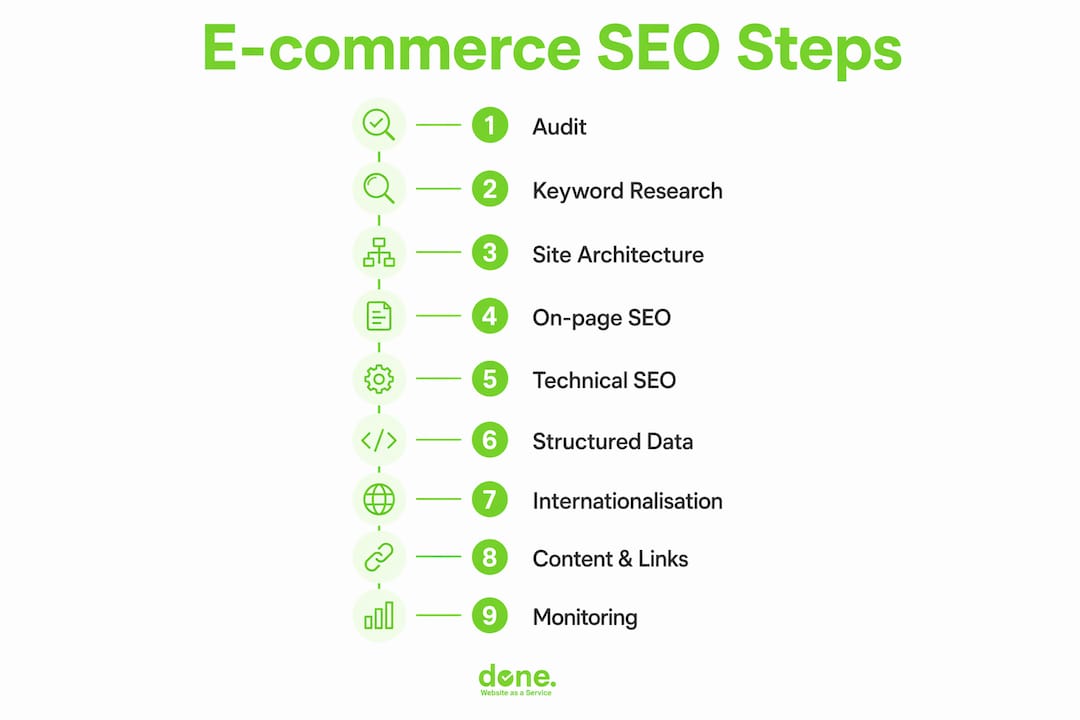
Keyword research for e-commerce is not about finding the highest-volume terms. It is about matching the right query to the right page type so your traffic actually converts. The role of SEO in e-commerce success depends almost entirely on this mapping being correct.
Step-by-step process:
- Seed keywords from your catalogue. Pull your top 50 product categories and brand names. These are your head terms.
- Expand with Google Search Console query data. Filter by page type (PDP vs PLP) and look for queries driving impressions but low clicks — these are ranking opportunities you are not fully capturing.
- Classify intent for each keyword group:
- Transactional (“buy running shoes Luxembourg”) → product or category page
- Commercial investigation (“best running shoes for flat feet”) → buying guide or comparison page
- Informational (“how to choose running shoes”) → blog post or FAQ
- Map to page type. Never try to rank a product page for an informational query, or a blog post for a transactional one. The SERP will tell you which format Google expects: check the top 10 results for your target query and match the dominant format.
- Prioritise by revenue adjacency. Use GA4 to identify which category pages already drive the most revenue, then focus keyword expansion on those first.
Example keyword map for a Central European outdoor retailer:
- “hiking boots men waterproof” → product page (transactional)
- “hiking boots” → category page (navigational/transactional)
- “best hiking boots 2026” → buying guide (commercial investigation)
- “how to waterproof hiking boots” → blog post (informational)
For Central Europe, include language variants. A Luxembourg store may need keyword research in French, German, Luxembourgish and English. Google Search Console’s search analytics filter by country is the most reliable source for local query data, and it is free.
Pro Tip: Use the “Queries” report in Search Console filtered to your top category pages. Sort by impressions descending. Any query with more than 500 impressions and a click-through rate below 3% is a title tag or meta description problem, not a ranking problem.
Does your site architecture help or hurt product discovery?
Site architecture determines whether Google can find your products and whether shoppers can buy them. The guiding principle is simple: any product should be reachable in roughly three clicks from the homepage. Deeper than that and you risk crawl budget waste and orphan pages.
Architecture checklist:
- Flat taxonomy. Homepage → Category → Sub-category → Product. Avoid adding extra levels for the sake of organisation.
- Descriptive URL slugs. Use
/en/hiking-boots/mens-waterproof/not/en/cat=12&sub=47&prod=8821. Clean slugs are easier to crawl, share and understand. - Breadcrumb schema on every page. Breadcrumbs communicate structure to both users and search engines. Mark them up with BreadcrumbList JSON-LD.
- Stable HTML navigation links. Sub-category links in menus must render in HTML, not depend on JavaScript that bots may not execute.
- Prioritise internal links to profitable categories. Link to your highest-margin, best-converting categories from the homepage and top-level navigation. Avoid spreading link equity evenly across everything.
Faceted navigation: the most common source of index bloat
Faceted navigation is consistently the leading cause of crawl budget exhaustion and duplicate URLs on e-commerce sites. A catalogue with 500 products and 10 filter attributes can generate millions of parameter URLs. Most of them have no search demand and should never be indexed.
The practical policy:
- Identify filter combinations that have real search volume (use Search Console and internal site-search data).
- Turn those combinations into clean SEO pages with readable URLs, unique content and internal links.
- Canonicalise all other filter URLs to the parent category page, or apply
noindexand block them inrobots.txtwhere appropriate. - Never leave filter URLs in your XML sitemap unless they are deliberately indexed SEO pages.
URL structure example for a Central European store:
✓ /fr/chaussures-randonnee/hommes/
✓ /de/wanderschuhe/herren/
✗ /products?cat=shoes&gender=male&sort=price_asc&page=3
How should you optimise product and category pages for SEO?
Product and category pages are where organic traffic converts into revenue. Getting them right requires both technical correctness and genuine content quality.
Product page checklist:
- Unique product description of 300 words or more. Never use the supplier’s copy verbatim — duplicate content across multiple retailers will not rank.
- Title tag format:
[Product Name] | [Key Attribute] | [Brand]— keep it under 60 characters. - H1 matching the primary keyword for that product.
- Product schema with all required fields:
name,image,description,brand,sku,gtinormpn,offers(withpriceCurrencyandavailability), andaggregateRatingwhen you have genuine reviews. - Price and availability visible above the fold and matching the schema values exactly.
- At least three product images in AVIF or WebP format with descriptive alt text (
alt="Men's waterproof hiking boots in brown leather, size 42"). - Reviews section with AggregateRating schema — only when reviews are authentic and GDPR-compliant.
- Clear CTA (add to basket) visible without scrolling on mobile.
- Internal links to related products and the parent category.
Category page checklist:
- 300–500 words of unique descriptive content at the top or bottom of the page. Multiple audits confirm this length as a strong ranking factor for competitive head terms.
- H1 aligned with the primary keyword for that category.
- Canonical tag pointing to itself (self-referential) on page 1; paginated pages should either self-canonicalise or canonicalise to page 1 depending on your SERP testing.
- Internal links to sub-categories and priority products using descriptive anchor text.
- FAQ block where the SERP shows informational intent alongside transactional results.
Image optimisation steps:
- Convert all product images to AVIF with WebP as a fallback using a
<picture>element. - Add
widthandheightattributes to every<img>tag to prevent layout shift (CLS). - Use
loading="lazy"on images below the fold; usefetchpriority="high"on the hero/main product image. - Keep file sizes below 100 KB for thumbnails and below 300 KB for hero images.
For UX and conversion, place the primary CTA within the first viewport on mobile, show star ratings near the product title, and display delivery time and return policy on the product page itself. These details affect both conversion rate and e-commerce website optimisation scores.
How do you audit technical SEO and Core Web Vitals for an e-commerce site?
Technical SEO is where most e-commerce stores lose rankings without realising it. A structured audit flow prevents that.
Performance audit steps:
- Measure field data first. Open Google Search Console → Core Web Vitals report. This shows real-user data for your URLs, not lab estimates. Identify which page templates (PDP, PLP, checkout) fail.
- Run Lighthouse on failing templates. Use Chrome DevTools or PageSpeed Insights. Note LCP element, INP bottlenecks and CLS sources.
- Fix LCP. The LCP element on most product pages is the hero image. Apply
fetchpriority="high", serve it in AVIF/WebP, and preload it in the<head>. - Fix CLS. Add explicit
widthandheightto all images and reserve space for dynamically loaded elements (reviews widgets, cookie banners). - Fix INP. Defer non-critical JavaScript, remove unused third-party scripts, and audit apps or plugins that inject scripts on page load. NitroPack handles much of this automatically for supported platforms.
- Re-measure after each change. Do not batch all fixes and measure once — you need to know which change moved the needle.
Indexing and crawlability checklist:
- XML sitemap contains only canonical, indexable URLs — no redirects, no noindex pages, no parameter URLs.
robots.txtblocks sort and filter parameters that generate noise without blocking CSS/JS resources needed for rendering.- Canonical tags are consistent: the canonical URL, the sitemap URL, the redirect destination, and the indexability status must all agree.
- Pagination is crawlable (HTML links, not JavaScript-only) but paginated pages beyond page 1 are typically not indexed unless they show genuine search demand.
- No redirect chains longer than one hop. A 301 pointing to another 301 wastes crawl budget and dilutes link equity.
Rendering strategy for 2026:
Incremental static regeneration (ISR) is the recommended architecture for product detail pages in 2026. It delivers static-page speed with background rebuilds when price or availability changes. Pure client-side rendering (CSR) for PDPs remains a ranking risk: Google’s December 2025 rendering update confirmed that pages returning non-200 status codes may be excluded from the rendering pipeline entirely, meaning JS-rendered content on error pages may never be seen by bots.
Keep temporarily out-of-stock product pages as 200 OK. Return a 404 and you lose the page’s accumulated link equity and ranking signals. Instead, mark ItemAvailability: OutOfStock in schema, surface server-rendered similar products, and strengthen the internal link back to the parent category.
Why does structured data matter so much for e-commerce in 2026?
Structured data has moved from a nice-to-have to a core discipline. Comprehensive schema for Product, Offer and AggregateRating can increase AI citation probability by as much as 340% when implemented correctly. That matters because AI-powered search results (Google’s AI Overviews, Perplexity, Bing Copilot) increasingly pull product data directly from structured markup rather than from page copy.
Required JSON-LD fields for a product page:
{
  "@type": "Product",
  "name": "Men's Waterproof Hiking Boots",
  "image": "https://example.com/images/hiking-boots.jpg",
  "description": "Durable waterproof hiking boots for men...",
  "brand": { "@type": "Brand", "name": "TrailPro" },
  "sku": "TB-M-42-BRN",
  "gtin13": "1234567890123",
  "offers": {
    "@type": "Offer",
    "priceCurrency": "EUR",
    "price": "149.00",
    "availability": "https://schema.org/InStock"
  },
  "aggregateRating": {
    "@type": "AggregateRating",
    "ratingValue": "4.6",
    "reviewCount": "128"
  }
}
The minimum required fields are name, image, description, brand, sku, gtin/mpn, offers with priceCurrency and availability, and aggregateRating when reviews exist.
Validation checklist:
- Place JSON-LD in the
<head>or at the end of<body>— not inside<noscript>tags. - Test every template with Google’s Rich Results Test before deployment.
- Check Search Console’s “Shopping” and “Products” rich result reports weekly after launch.
- Acceptance criterion: zero errors in the Rich Results Test and at least one rich result type eligible for your product pages.
Also implement BreadcrumbList schema on every page and FAQ schema on category pages where a FAQ block exists. These two additions cost little developer time and consistently improve click-through rates in the SERP.
Pro Tip: In our experience with clients, the most common schema error is a mismatch between the price shown on the page and the price in the JSON-LD. Google will suppress rich results for price inconsistencies. Automate schema generation from your product database rather than hardcoding it.
How do you handle internationalisation for a Central European e-commerce store?
Multi-country e-commerce in Central Europe typically involves at least two languages and often three or four currencies. Getting the technical setup right matters, but hreflang alone is not enough if the page does not meet local intent and expectations.
URL structure decision matrix:
| Structure | Pros | Cons | Best for |
|---|---|---|---|
ccTLD (.lu, .de, .fr) |
Strongest geo-signal, clear to users | Highest cost, separate link equity | Established brands with budget |
Subfolder (/fr/, /de/) |
Shared domain authority, easier to manage | Weaker geo-signal than ccTLD | Most SMEs in Central Europe |
Subdomain (fr.example.com) |
Separate crawl, easy to set up | Treated as separate site by Google | Rarely recommended for SMEs |
For most SMEs in Luxembourg and Central Europe, subfolders are the practical choice. They share domain authority and are simpler to maintain than multiple ccTLDs.
Hreflang implementation checklist:
- Add
hreflangtags to every page in every language variant, including anx-defaulttag. - Every hreflang tag must have a return tag: if
/fr/points to/de/, then/de/must point back to/fr/. - Use absolute URLs in hreflang tags, not relative paths.
- Include hreflang in the XML sitemap as well as in the
<head>. - Check the International Targeting report in Search Console monthly.
Localisation checklist beyond translation:
- Display prices in the local currency (EUR for Luxembourg, Germany, France; CHF for Switzerland).
- Show VAT-inclusive prices where legally required (B2C in the EU).
- List local payment methods: Bancontact for Belgium, TWINT for Switzerland, Klarna across Germany and Austria.
- Include local delivery times and return policies — not a generic European policy.
- Display trust signals relevant to each market: Trusted Shops badge for German-speaking markets, for example.
- Adapt legal notices: cookie consent, privacy policy and terms must comply with local regulations and GDPR.
Avoid publishing identical content across language variants. Identical pages cause cannibalisation and poor conversions. Localise product descriptions, category intros and buying guides, not just the interface strings.
What content and link-building tactics work for e-commerce SEO?
Content and links remain the two most durable ranking factors. For e-commerce, the formats that work are specific and tied to commercial intent.
Content formats that convert:
- Buying guides. A 1,500–2,500 word guide targeting “best [product category] for [use case]” captures commercial investigation queries and links naturally to product and category pages. These pages often rank for dozens of long-tail variants.
- Comparison pages. “Product A vs Product B” pages capture high-intent queries from shoppers close to a purchase decision. They work best when you stock both products.
- How-to content. “How to choose [product]” or “How to use [product]” posts build topical authority and attract links from publishers and forums.
- FAQ blocks on category pages. Where the SERP shows informational snippets alongside product listings, a well-structured FAQ block can capture both the featured snippet and the product listing.
Review acquisition:
- Ask for reviews at the post-purchase stage via email, timed 7–14 days after delivery.
- Display reviews prominently on product pages and mark them up with AggregateRating schema.
- Under GDPR, you must not incentivise reviews in a way that creates bias, and you must be able to demonstrate reviews are genuine. Keep a record of the purchase associated with each review.
- For social proof tactics that feed into review acquisition, social media management can amplify review requests and surface user-generated content.
Practical link-building for retailers:
- Supplier and brand partnerships. Ask suppliers to link to your store from their “where to buy” pages. These links are highly relevant and often easy to obtain.
- Local PR. A Luxembourg or Central European retailer launching a new product line or a sustainability initiative has a genuine story for local business press. One well-placed article in a regional publication can deliver links that take months to earn through outreach.
- Curated buying guides. Pitch your products to journalists and bloggers writing seasonal gift guides or “best of” roundups. Timing matters: pitch 6–8 weeks before publication.
- Product data syndication. Submit accurate product data to Google Merchant Centre and comparison shopping engines. These are not traditional backlinks, but they drive discovery and referral traffic that supports organic performance.
Which KPIs and dashboards should you monitor in GA4 and Search Console?
Measurement ties SEO work to revenue. Without the right KPIs, you cannot tell whether a fix worked or whether a traffic drop is a ranking change or a tracking issue.
Essential KPIs:
- Organic revenue by landing page (GA4 → Acquisition → Traffic acquisition, filtered by organic search, then by landing page)
- Organic conversion rate by category page
- Assisted conversions from organic (GA4 → Advertising → Attribution)
- Impressions and CTR by query group (Search Console → Performance)
- Core Web Vitals pass rate by page template (Search Console → Core Web Vitals)
GA4 e-commerce events to verify:
| Event | Trigger | Key parameters |
|---|---|---|
view_item |
Product page load | item_id, item_name, price |
add_to_cart |
Add to basket click | item_id, currency, value |
begin_checkout |
Checkout page load | currency, value |
purchase |
Order confirmation | transaction_id, value, currency |
All four events must fire with correct parameters before you can trust organic revenue attribution. Use GA4’s DebugView to verify in real time.
Weekly Search Console checks:
- Coverage report: watch for spikes in “Excluded” URLs, particularly “Duplicate without user-selected canonical” and “Crawled, currently not indexed.”
- Rich results report: check for new errors on Product and Breadcrumb types.
- Performance report: filter by query, look for branded queries cannibalising non-branded category terms, and watch for new queries entering the top 20 that you are not targeting with dedicated pages.
For a broader view of how digital marketing workflows connect SEO data to revenue reporting, a structured dashboard combining GA4 and Search Console data is worth building early.
Platform notes for Shopify, WooCommerce and Magento
Shopify:
- Shopify generates Product schema by default, but the implementation varies by theme. Audit your theme’s JSON-LD output with the Rich Results Test before assuming it is correct.
- Shopify’s URL structure for collections and products is fixed (
/collections/and/products/). You cannot change this without a custom app, so focus optimisation effort on title tags, meta descriptions and content rather than URL structure. - Every third-party app you install can inject render-blocking scripts. Audit your app list quarterly using Lighthouse. Remove any app that adds more than 200 ms to page load without a clear revenue justification.
- NitroPack has a native Shopify integration that handles image optimisation, caching and script deferral without code changes.
WooCommerce:
- Install AIOSEO (All in One SEO) for title templates, schema generation, XML sitemap management and redirect handling. It reduces the developer time needed for routine on-page tasks significantly.
- WooCommerce’s performance depends heavily on hosting. A shared hosting environment will fail Core Web Vitals on any catalogue of meaningful size. Use a managed WordPress host with object caching (Redis or Memcached) and a CDN.
- Use AVIF/WebP image conversion at the server level or via a plugin. WooCommerce does not convert images by default.
- Review your
wp-cronand database query load — large catalogues with many product variations generate slow queries that affect Time to First Byte (TTFB).
Magento:
- Magento’s layered navigation (faceted filtering) generates parameter URLs by default. Configure URL rewrites and set non-canonical filter combinations to
noindexin the admin panel or via a dedicated SEO extension. - For large catalogues (10,000+ SKUs), run a crawl audit by template rather than URL by URL. Screaming Frog or Sitebulb on a sample of each template type is faster and more actionable than a full crawl.
- Magento’s full-page cache (Varnish) is effective but requires correct configuration. Ensure cache invalidation does not wipe the entire cache on every product update — this is a common misconfiguration that destroys performance under load.
- Consider a headless or ISR architecture for PDPs if your catalogue changes price or availability frequently. Static pages with stale prices create trust issues and can trigger Google’s schema validation errors.
What does a realistic implementation timeline and budget look like?
Knowing what things cost and how long they take is what separates a useful SEO plan from a wishlist. The figures below reflect typical Central European agency and contractor rates in 2026.
| Workstream | Timeframe | Owner | Estimated cost band |
|---|---|---|---|
| Title/meta audit and fixes | 3–5 days | Marketing/Agency | Low (€500–€1,500) |
| Image optimisation (AVIF/WebP, alt text) | 1–2 weeks | Developer | Medium (€1,500–€2,500) |
| Schema implementation (Product, Offer, Rating) | 1–2 weeks | Developer | Medium (€1,500) |
| Canonical and noindex policy | 1–2 weeks | Developer | — |
| Core Web Vitals remediation | 2–6 weeks | Developer/Agency | High (several thousand euros) |
| Faceted navigation architectural fix | 4–12 weeks | Developer/Agency | — |
| Hreflang and localisation | 2–4 weeks | Developer/Marketing | Medium (€2,000) |
| Full SEO audit and remediation plan | 1–2 weeks | Agency | Medium (€2,000) |
| Ongoing monthly optimisation | Ongoing | Agency | Medium (€1,500/month) |
When to use in-house resources vs an agency:
- In-house: title tags, meta descriptions, content writing, review acquisition, GA4 event verification (with developer support).
- Contractor: image optimisation, schema implementation, redirect mapping.
- Agency: Core Web Vitals remediation, faceted navigation architecture, hreflang implementation, full technical audits. These tasks require both technical depth and SEO judgement that most in-house teams do not have simultaneously.
For e-commerce growth strategies in Central Europe, the most cost-effective approach is typically a one-time audit and remediation engagement followed by a monthly retainer covering monitoring, content and link-building.
How do you prioritise fixes when resources are limited?
The impact × effort matrix is the fastest decision tool for owners who cannot do everything at once. Score each task on two axes: organic revenue impact (1–5) and implementation effort (1–5, where 5 is hardest). Divide impact by effort to get a priority score.
How to build the matrix:
- List every identified fix from your audit.
- Score each on impact (how much organic revenue could this unlock?) and effort (how many developer or marketing hours does this require?).
- Calculate priority score: Impact ÷ Effort.
- Sort descending. Start at the top.
Sample scored tasks:
| Task | Impact (1–5) | Effort (1–5) | Priority score |
|---|---|---|---|
| Fix duplicate title tags | 5 | 1 | — |
| Add Product schema | 5 | 2 | 2.5 |
| Fix redirect chains | 4 | 1 | — |
| Compress product images | 4 | 2 | — |
| Fix faceted nav index bloat | 5 | 5 | — |
| Write category page content | 3 | 2 | — |
| Implement hreflang | 4 | 3 | — |
Triage advice:
Start with revenue-adjacent pages first: your top 10 category pages and top 20 product pages by organic sessions. A fix on a page that already ranks on page 2 for a high-volume query will return results faster than the same fix on a page with no existing visibility.
Fix technical blockers before content. A category page with a canonical pointing to a noindex URL will not rank regardless of how good the content is. Unblock indexing first, then invest in content.
For SEO best practices tailored to SMBs, the priority order is almost always: fix indexing blockers → fix performance → add schema → improve content → build links.
Key takeaways
Stores that fix technical blockers first and then layer in schema, content and localisation consistently outperform those that start with content alone — the 47% organic revenue gap and 62% conversion rate uplift between technically sound and technically deficient stores makes the sequencing clear.
| Point | Details |
|---|---|
| Fix indexing blockers first | Canonical conflicts, noindex errors and redirect chains prevent any other SEO work from taking effect. |
| Schema drives AI and SERP visibility | Product, Offer and AggregateRating schema can increase AI citation probability by as much as 340% when implemented correctly. |
| Faceted navigation needs a policy | Index only filter combinations with real search volume; canonicalise or noindex the rest to prevent crawl budget waste. |
| Localisation goes beyond translation | Currency, payment methods, delivery times and legal notices must match each market for pages to convert. |
| Measure organic revenue, not just traffic | GA4 e-commerce events (view_item, add_to_cart, purchase) must fire correctly before SEO results can be attributed to revenue. |
| Done handles audits and remediation | Done’s e-commerce SEO audits cover technical fixes, schema, localisation and ongoing optimisation for Central European SMEs. |
What Done’s approach to e-commerce SEO looks like in practice
Most e-commerce SEO problems we see at Done are not content problems. They are indexing problems dressed up as content problems. A client comes to us saying their category pages do not rank despite good content, and within the first hour of an audit we find that half those pages have canonical tags pointing to paginated or filtered variants or that the sitemap is full of parameter URLs that have been diluting crawl budget for months.
The fix is rarely glamorous. It is a canonical policy, a sitemap rebuild, and a robots.txt update. But the results are concrete: pages that were stuck on page 3 move to page 1 within 8–12 weeks of the technical fix, without a single new word of content being written.
We prioritise revenue-adjacent pages first. That means starting with the category pages that already drive the most organic sessions and fixing whatever is preventing them from ranking higher, before touching pages with no existing visibility. It is a faster path to measurable ROI.
For multi-country stores in Central Europe, Technical Entity Management is the second priority after indexing. Getting Product, Offer and AggregateRating schema correct across all language variants, with prices in the right currency and availability accurately reflected, is what qualifies pages for rich results and AI citation. We have seen this alone move a client’s organic click-through rate from 2.1% to 4.7% on their top category pages, purely from rich result eligibility.
An audit with Done typically takes one to two weeks, covers technical, on-page, schema and localisation, and delivers a prioritised remediation plan with effort estimates. Remediation can be handled by your in-house developer following the plan, or by Done’s team end to end.
How Done can help you move from checklist to results
Done is a Luxembourg-based digital and AI agency with over 350 completed projects since 2014. For e-commerce owners in Central Europe, Done offers a concrete alternative to generic SEO retainers: a structured audit that identifies exactly which fixes will move organic revenue, followed by hands-on remediation and ongoing optimisation.
The audit covers technical SEO (Core Web Vitals, indexing, schema, faceted navigation), on-page optimisation (product and category pages), localisation (hreflang, currency, legal notices) and measurement setup (GA4 e-commerce events, Search Console dashboards). Deliverables include a prioritised fix list with effort estimates, so you can choose to implement in-house or hand the work to Done’s team.
There are no setup fees and no long-term contracts required to start. Many clients see measurable organic revenue improvement within a few weeks of remediation, depending on the severity of the technical issues found. To discuss your store’s specific situation and get a scoped quote, visit Done’s agency page or explore the web development services that underpin our e-commerce SEO work.
Useful tools and references
Validation and audit tools:
- Google Search Console — coverage, Core Web Vitals, rich results, international targeting. Free. Use weekly.
- Google Analytics 4 (GA4) — organic revenue attribution, e-commerce event tracking, assisted conversions. Free. Set up before any other tool.
- Lighthouse / PageSpeed Insights — lab-based performance diagnostics. Free. Run on every key template after changes.
- Google Rich Results Test — validates Product, Breadcrumb and FAQ schema. Free. Run before and after schema deployment.
- Schema.org — the canonical reference for structured data types and properties. Use it to verify field names and accepted values.
- NitroPack — server-side performance optimisation for Shopify, WooCommerce and other platforms. Paid, with a free tier. Useful when developer time is limited.
- AIOSEO (All in One SEO) — WordPress/WooCommerce plugin for title templates, schema, sitemaps and redirects. Paid, with a free version. Reduces developer dependency for routine on-page tasks.
When to hire an expert:
Faceted navigation architecture, Core Web Vitals remediation on large catalogues, and hreflang implementation across three or more markets are the three tasks where specialist agency involvement consistently delivers faster and more reliable results than in-house attempts. The complexity is not in understanding what needs to be done — it is in implementing it correctly without breaking existing rankings or introducing new crawl issues.
For further reading on e-commerce optimisation and digital strategy for Central European SMEs, Done’s resources on e-commerce best practices and web design for e-commerce cover the broader context in which SEO operates.
This article is general information for planning purposes. Tax rates, legal requirements and platform capabilities change frequently. Verify current rules with the relevant authority or a qualified professional for your specific situation.