

Ecommerce ROI That Matches Your Bank for Lithuanian Stores
September 5, 2026
Three Sales Funnel Automations SMBs Must Fix First for Real ROI
September 7, 2026
Send the GA4 purchase event with a unique transaction_id, correct numeric value and an ISO currency code, then verify it in DebugView before you trust a single number in your reports. Everything else, including which reports to check and how to reconcile revenue, depends on getting that one event right. Get this wrong and your Google Ads bidding, your monthly revenue reports, and every decision built on them will be wrong too.
TL;DR:
- Sending a purchase event with a unique transaction ID, numeric value, and ISO currency code is essential for accurate revenue tracking and downstream decision-making.
- Validate that the purchase event fires correctly in DebugView, with unique transaction IDs, proper data types, and consistent item IDs across events.
- Prioritize implementing
purchase,add_to_cart, andbegin_checkoutevents, with accurate parameters, before focusing on less critical product-level or view events.- Reconcile data daily by comparing GA4 revenue figures with payment processor reports, checking for missing IDs, string-value errors, and timezone mismatches.
- Regularly test and verify setup at each step, especially after changes, to prevent silent errors from rendering reports inaccurate for weeks or months.
Table of Contents
- Quick checklist for GA4 e-commerce tracking
- Setup options: gtag, GTM or server-side
- Which ecommerce events and parameters matter most
- How to build the dataLayer and GTM tags correctly
- Validating with DebugView and fixing revenue mismatches
- Which GA4 reports and KPIs actually matter for retail
- Getting consent and enhanced conversions right
- Done.lu’s audit checklist and a real fix
- Why most GA4 ecommerce guides miss the point
- How Done.lu handles GA4 ecommerce implementation
- Sources
Quick checklist for GA4 e-commerce tracking
Before you touch reports or dashboards, run through this list. It takes five to thirty minutes and tells you whether your ecommerce measurement can be trusted at all.
- The
purchaseevent fires and appears in DebugView on a real test transaction. transaction_idis unique per order and identical across every event tied to that order.valueis sent as a number, never as a string with a currency symbol attached.currencyuses a proper ISO 4217 code (EUR, not “euros” or “€”).- Data retention in Admin → Data Settings is set beyond the short default if you need historical comparisons.
- Google Ads link and BigQuery export are configured if you plan to use Smart Bidding or run deeper analysis.
- You have reconciled at least one full day of orders line by line against your payment processor.
Miss any of these and the rest of your GA4 setup is built on sand.
Setup options: gtag, GTM or server-side
Which route you take depends on your platform, your team, and how much control you have over the checkout code.
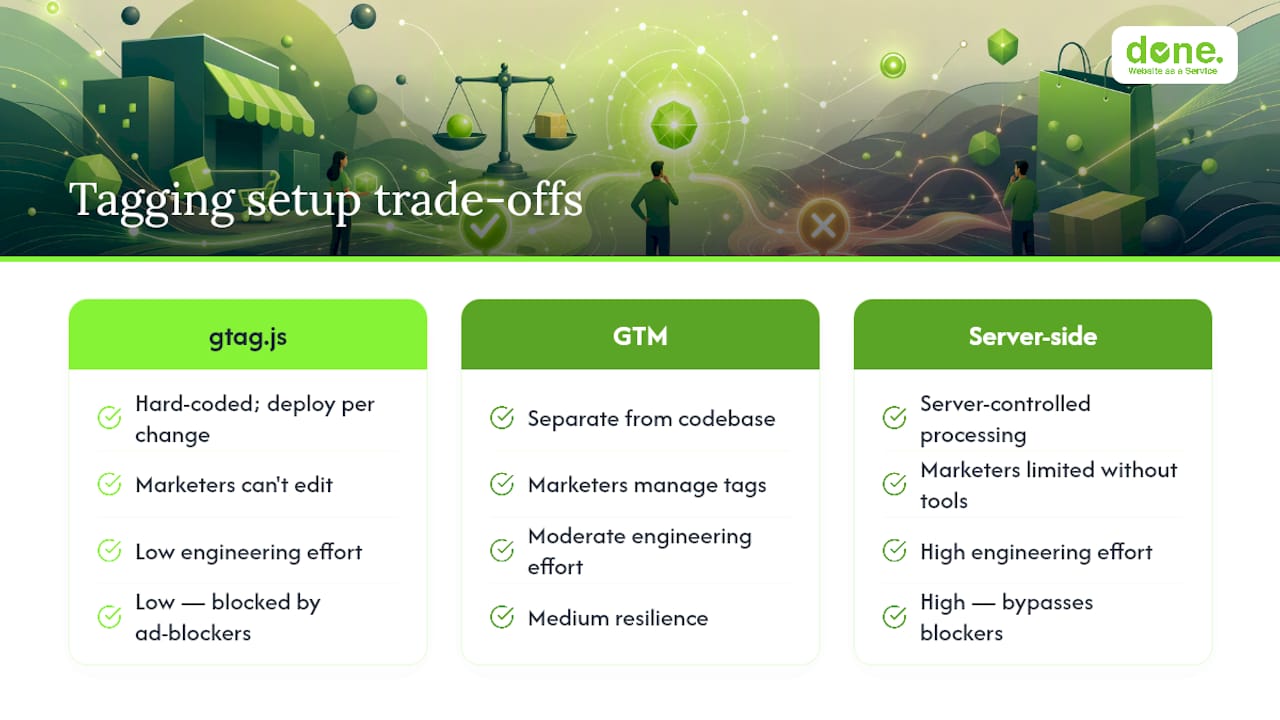
gtag.js works fine for small, simple stores where a developer can hard-code events directly into the page. It’s fast to deploy but brittle: every change to a tag means a code deployment, and marketers can’t touch it without engineering help.
Google Tag Manager (GTM) is the practical default for most online stores. It separates tracking logic from your codebase, lets marketing teams manage triggers and variables without redeploying the site, and gives you version history so you can roll back a bad change in seconds.
Server-side tagging earns its complexity when you’re dealing with heavy ad-blocker traffic, strict consent requirements under GDPR, or attribution loss on iOS. It moves event processing to a server you control, which improves data consistency for revenue and conversion measurement, particularly once cookie restrictions kick in.
Pro Tip: If you’re running a custom-built platform rather than a hosted one like Shopify or WooCommerce, check with your developer whether the checkout confirmation page has stable access to order data before choosing your setup route. If it doesn’t, that’s the actual blocker, not the tagging method.
Server-side becomes worthwhile once monthly revenue and ad spend justify the extra engineering time.
Which ecommerce events and parameters matter most
Not every event carries equal weight. Prioritise in this order:
purchase(P0). This is the event that populates revenue reports and feeds Google Ads Smart Bidding. Get this wrong and every downstream decision, from budget allocation to product strategy, is built on false data.add_to_cartandbegin_checkout(P1). These reveal where shoppers drop off and are essential for retargeting audiences.view_itemandview_item_list(P2). Useful for product-level analysis but less urgent to launch first.
Every event that touches a product needs an items array, and each item needs item_id, item_name, price and quantity at minimum. The item_id must stay identical across every event for that product, because mismatched item IDs break product-level reporting entirely and leave your item reports empty.
At event level, purchase needs transaction_id, currency and value. Send numbers as numbers, not strings, and use proper ISO currency codes. If you run promotions, add the promotion events so discount performance shows up separately from full-price sales. Refunds need their own refund event referencing the original transaction_id, or your net revenue figures will run permanently high.
How to build the dataLayer and GTM tags correctly
A working purchase event needs a dataLayer push on the confirmation page (or on the button click, per Google’s own guidance) containing transaction_id, value, currency, tax, shipping and the items array with consistent item IDs. That object needs to exist before your GTM tag fires, not after.
In GTM, you’ll need three pieces: a GA4 Configuration tag loaded on every page, a GA4 Event tag for purchase that reads from dataLayer variables, and a trigger that fires only on the confirmation page or successful order event. Set up consent configuration in GTM at the same time, not as an afterthought.
If you’re moving to server-side, the architecture shifts: your site sends events to a server container you control, which then forwards enriched data (hashed identifiers, enhanced conversions) to GA4 and Google Ads. Client-side stays lean; sensitive matching happens server-side.
Pro Tip: The single most common pitfall we see is the dataLayer push firing before the transaction data is fully populated, so GA4 receives an empty or partial items array. Always fire the tag on page load completion, not on page load start.
- Test with a real order, not a hardcoded example, before launch.
- Check that refresh doesn’t fire
purchasetwice. - Confirm the trigger doesn’t fire on the cart page by mistake.
Validating with DebugView and fixing revenue mismatches
Enable debug_mode (via GTM’s preview mode or a URL parameter) and open DebugView in GA4. You’ll see events arrive in real time, parameter by parameter, which is the only reliable way to confirm your purchase event actually carries what you think it carries.
The recurring mistakes we run into during audits:
- Price sent as a string (“29.99 €”) instead of a plain number.
- Missing or malformed
currencyfield. - Duplicate or missing
transaction_idvalues across repeat page loads. - Inconsistent
item_idbetweenview_itemandpurchasefor the same product.
Reconciliation is simple in principle: pick one full day, pull GA4 revenue for that day, and compare it line by line against your payment processor’s export. Filter out test orders and refunds on both sides, and check for timezone or currency mismatches before assuming the numbers are genuinely wrong. A short, disciplined workflow, debug first, then sample-day reconciliation, then ongoing sanity checks, catches small bugs before they become months-long blind spots. If the gap persists after that check, it’s time for a proper developer audit rather than more guesswork in the interface.
Which GA4 reports and KPIs actually matter for retail
Once events are firing cleanly, three reports do most of the work: Monetization → Ecommerce purchases for revenue and transaction counts, Item reports for product-level performance, and Acquisition → Traffic acquisition for which channels actually drive sales rather than just visits.
The KPIs worth watching weekly:
- Purchases and revenue (the headline numbers).
- Conversion rate by channel.
- Average order value (AOV).
- Cart abandonment rate between
begin_checkoutandpurchase. - Lifetime value (LTV) and return on ad spend (ROAS), once enough history has accumulated.
For anything beyond standard reports, such as joining GA4 data with CRM records or ad cost data, use Explorations inside GA4 or export to BigQuery. BigQuery export is worth setting up early even if you don’t need it yet, since raw event-level data compounds in value the longer you keep it.
Getting consent and enhanced conversions right
Consent mode has to be configured so analytics_storage genuinely respects what the visitor chooses, not just logged as a formality. If consent is denied, GA4 should receive modelled, not raw, behavioural data.
Enhanced conversions work by sending hashed first-party identifiers, such as a hashed email, alongside your conversion events, which helps recover conversions otherwise lost to ad blockers or iOS tracking restrictions. Implemented correctly, this typically recovers a meaningful share of conversions that would otherwise vanish from attribution.
Never send raw personal data, names, emails, addresses, into GA4 directly. Hash it first, ideally server-side, and document exactly what you’re sending and why. That documentation matters as much for your own audit trail as for any regulator.
Done.lu’s audit checklist and a real fix
We’ve run this exact audit on ecommerce builds including Ariki and Wir24, and the pattern repeats: retention set too short, no debug testing before launch, and item IDs that don’t match across events.
Our checklist stays consistent: check retention settings first, confirm debug_mode works, verify every required parameter is present and correctly typed, then reconcile one sample day against the payment processor.
One recent fix: a client’s purchase event was sending value as a formatted string (“49,99”) rather than a number. GA4 silently dropped the value from revenue calculations for weeks. Revenue reports showed transactions but near-zero income. A single line of code fixed it, and revenue reporting matched the payment processor within a day.
Why most GA4 ecommerce guides miss the point
Most advice on this topic treats GA4 ecommerce setup as a configuration exercise: tick the boxes, enable the events, done. That’s backwards. The configuration is the easy part. The hard part, and the part that actually determines whether your reports mean anything, is validation discipline.
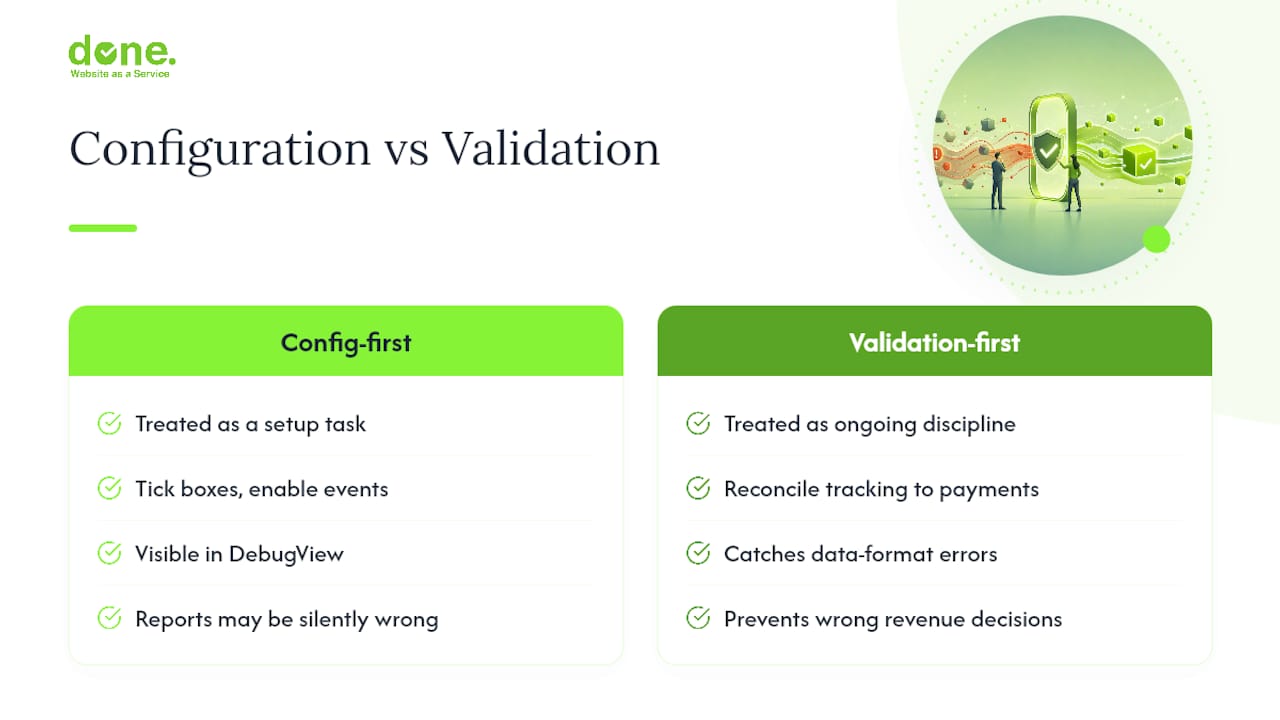
In our experience, the businesses that get burned aren’t the ones who skipped implementation. They’re the ones who implemented it once, saw numbers appear in the dashboard, and never checked whether those numbers were correct. A purchase event with a string-formatted price will still show up in DebugView. It just won’t show up correctly in your revenue reports, and nobody notices until a quarter’s worth of decisions have been made on bad data.
Prioritise reconciliation over reporting elegance. A plain spreadsheet comparing one day’s GA4 revenue against your payment processor tells you more about the health of your tracking than any dashboard. Do that before you build a single Exploration or connect BigQuery. Everything downstream depends on this being right first.
— Thomas
How Done.lu handles GA4 ecommerce implementation
If your revenue numbers in GA4 don’t match your payment processor, or you’ve never actually checked whether they do, that gap is fixable in days, not months. You can choose an audit and fix approach instead of hiring a full-time analytics specialist for GA4 ecommerce work, avoiding an ongoing retainer.

Our typical engagement runs audit, fix, validation: we check your existing events against Google’s own recommended events list, correct parameter and data-type issues, then reconcile a sample day against your payment processor so you can trust the numbers before scaling ad spend on them. We also handle server-side setups where consent restrictions or ad-blocker traffic are distorting your data.
If you want a working GA4 ecommerce setup you can actually verify, start with our e-commerce development services or get in touch through Done to scope an audit.
Sources
- Measure ecommerce | Google Analytics | Google for Developers
- GA4 Set up ecommerce events – Analytics Help