

UTM tags for campaigns: how to build and track them properly
August 28, 2026
7 Step CFO Ready AI ROI Model for SMEs
August 30, 2026
Yes, you can install Matomo locally, and for most SMBs with basic IT capacity it is a sound choice. Matomo diegimas lokalus gives you full ownership of visitor data, but reliable operation requires adequate CPU and RAM resources as recommended by official guidelines, and commit to running cron for archiving plus a valid SSL certificate from day one. If nobody on your team can own that upkeep, managed or cloud hosting will save you more time than it costs.
TL;DR:
- A self-hosted Matomo installation requires at least 2 CPU cores, 2 GB of RAM, and NVMe storage, with faster I/O directly improving archiving performance.
- Proper setup depends on server access with root or sudo permissions, PHP 8.1+, and a dedicated database user to prevent common installation errors.
- Post-installation, regular maintenance like patching, backups, and monitoring is crucial to avoid silent failures and archiving bottlenecks.
- Managed hosting offers time savings and simpler upkeep for teams lacking sysadmin skills, especially when compliance and data sovereignty are not primary concerns.
- Prioritize operational checks such as verifying cron or systemd jobs, permissions, and SSL renewal over just the initial install for reliable data and dashboard freshness.
Table of Contents
- What do you need before starting a Matomo local installation?
- How do you install Matomo on a local server step by step?
- What post-install setup does Matomo actually need?
- How do you keep a self-hosted Matomo running reliably?
- Should you self-host Matomo or use managed hosting?
- Why trust this Matomo installation guidance?
- What matters more than the checklist
- Get help installing and managing Matomo the right way
- Sources
What do you need before starting a Matomo local installation?
Before you touch a terminal, be honest about whether your server and your access actually meet the job. A local Matomo installation guide is only useful if you can tick every box on this list first.
Matomo’s own documentation sets the baseline: 2 CPU cores, 2 GB RAM, and 50 GB of SSD storage for sites under 100,000 pageviews a month, running PHP 8.1 or newer with MySQL 8 or MariaDB. That is a floor, not a target. Treat it the way you’d treat a car’s minimum tyre pressure: technically legal, not what you’d actually drive on.
What you need on hand:
- Server access — SSH with root or sudo rights, not just an FTP login. Standard FTP transmits credentials in clear text, so use SCP or SFTP for every file transfer.
- PHP 8.1+ with extensions including
pdo_mysql,mbstring,gd, andzip. - A database server — MySQL 8 or MariaDB, with a dedicated user and schema created in advance.
- A web server — Apache with mod_rewrite, or Nginx with a configured rewrite block.
- DNS and a domain or subdomain pointed at the server, ready for an SSL certificate.
- Storage on NVMe or fast SSD, not spinning disk or budget cloud block storage.
Statistic Callout: Matomo’s archiving process is I/O-bound, not CPU-bound. Prioritise NVMe storage over extra CPU cores if you’re choosing between the two on a limited budget, and provision at least 4 GB RAM once you cross 100,000 pageviews a month.
A quick sanity check before you provision anything: run php -v, mysql --version, and df -h on the target server. If any of those commands fail or return a version below spec, fix that first.
How do you install Matomo on a local server step by step?
You have three realistic paths, and picking the wrong one wastes hours. A manual install on Debian or Ubuntu gives you full control but demands comfort with the command line. Docker Compose is faster to reproduce and easier to tear down if something goes wrong, though it adds a layer of abstraction that can obscure permission issues. A hosting panel installer (Plesk, cPanel) is the quickest to click through, but it often hides cron access and CLI PHP behind a support ticket.
Manual install on Debian or Ubuntu:
- Download the latest release directly from Matomo rather than a mirror, and verify the checksum.
- Unpack it into your web root, for example
/var/www/matomo. - Create the database and a dedicated MySQL user with privileges scoped to that schema only, never the root account.
- Set ownership so the web server user owns the files, then lock permissions: only
tmp/andconfig/need write access. - Configure a virtual host block pointing at the Matomo directory, enable the site, and reload the web server.
- Visit the domain in a browser to launch the web installer, which walks through the database connection, the first website profile, and the initial admin account.
Docker Compose path: a typical setup pairs a matomo image with a mariadb image, using named volumes for /var/www/html and the database data directory so upgrades don’t wipe your history. Set MATOMO_DATABASE_HOST and credentials as environment variables rather than hardcoding them into the image.
Control panel installers are convenient but limited. Verify with your host’s support team whether you can schedule cron jobs, run PHP from the CLI, and access error logs directly. If any of those three is blocked, a one-click installer will leave you stuck later when archiving stalls.
Pro Tip: Run the very first full archive manually from the command line and watch memory and disk I/O while it runs. Don’t purge raw visit logs until you’ve confirmed that first archive completed without errors.
Most installation failures trace back to three causes: incorrect file permissions after unpacking, a missing PHP extension the web installer didn’t warn about clearly, or a database user without adequate privileges. Check the Apache or Nginx error log first. It usually names the problem outright.
What post-install setup does Matomo actually need?
An installed Matomo is not a working Matomo until you’ve done four things that the web installer doesn’t force on you.

Archiving has to run automatically, or your dashboards will show stale numbers indefinitely. Systemd timers are the more reliable choice over plain cron for running core:archive, because they log failures properly and can be configured to restart. Whichever you choose, check the logs after the first scheduled run to confirm it actually executed.
Lock down the essentials:
- Delete or rename the
/misc/how-to-install.mdfile and disable the web installer once setup is complete. - Add your domain to the
trusted_hostsarray inconfig/config.ini.phpto block host header attacks. - Confirm file permissions again post-install:
config/andtmp/writable, everything else locked. - Install an SSL certificate via Let’s Encrypt or a commercial issuer, and force an HTTPS redirect at the web server level.
- Configure SMTP settings so scheduled reports and alert emails actually send.
- Set IP anonymisation and a sensible data retention window under Matomo’s privacy settings.
Statistic Callout: Treat the published minimum specs as installer floors, not production targets — give your production instance roughly double the RAM headroom and fast NVMe storage to avoid archiving bottlenecks as traffic grows.
Matomo also supports cookieless tracking configurations, which is worth setting up early if reducing consent banner friction matters to your site. Done has written a separate guide on cookieless analytics if that’s a priority for you.
How do you keep a self-hosted Matomo running reliably?
Installing Matomo is the easy 20%. The other 80% is the ongoing discipline of patching, backing up, and watching for silent failures.
Build this into a routine, not a one-off task:
- Patch Matomo, PHP, and your database engine on a regular cadence — delayed updates are the most common route to a compromised install.
- Take database dumps and file backups on a schedule, and actually test a restore at least once. An untested backup is a guess, not a safety net.
- Watch disk I/O, confirm cron or systemd archiving jobs succeeded, and skim logs weekly for anything unusual.
- Watch for archiving times creeping upward — that’s usually your first sign you need more RAM, faster storage, or both.
Pro Tip: Set a calendar reminder to check the archiving log every Monday morning. It takes ninety seconds and catches problems weeks before a client asks why last month’s report looks wrong.
If keeping up with this list feels like more than your team can absorb, Done’s audit and maintenance service covers exactly this kind of ongoing technical upkeep.
Should you self-host Matomo or use managed hosting?
Ask yourself these questions honestly before committing either way:
- Does anyone on your team already manage a Linux server, or would this be their first?
- Do you have a specific compliance or data sovereignty reason to keep analytics data off third-party infrastructure?
- What is your realistic monthly pageview volume, now and in twelve months?
- What is an hour of your own or your staff’s time actually worth against the hours patching and monitoring will cost?
Matomo’s own guidance frames the choice around these same three questions: cloud or on-premise, do you understand the requirements, and do you need paid support. Self-hosting wins when data sovereignty genuinely matters to your customers or regulator. Managed hosting often wins on pure economics, because staff time spent patching and monitoring frequently outweighs what a managed plan would cost. If you’d rather explore the trade-offs around on-premise infrastructure more broadly, Done’s guide on on-premise AI for SMBs covers similar sovereignty arguments.
Why trust this Matomo installation guidance?
Done has run 350+ web and infrastructure projects for SMBs since 2014, and Matomo installs sit squarely in that overlap between hosting, security, and GDPR configuration. Done’s hosting and security teams handle exactly the cron, permissions, and certificate work covered above for clients who’d rather not own it themselves. In one recent managed setup, a client’s stalled archiving turned out to be a disk I/O bottleneck, fixed within a day once flagged.
What matters more than the checklist
Every official Matomo doc assumes a level of sysadmin fluency most small business owners simply don’t have. That gap between “documented” and “usable” is where most local installs actually break down, not in the download step, but in the boring middle: cron jobs that silently stop running, permissions set once and never revisited, storage picked on price rather than I/O performance.
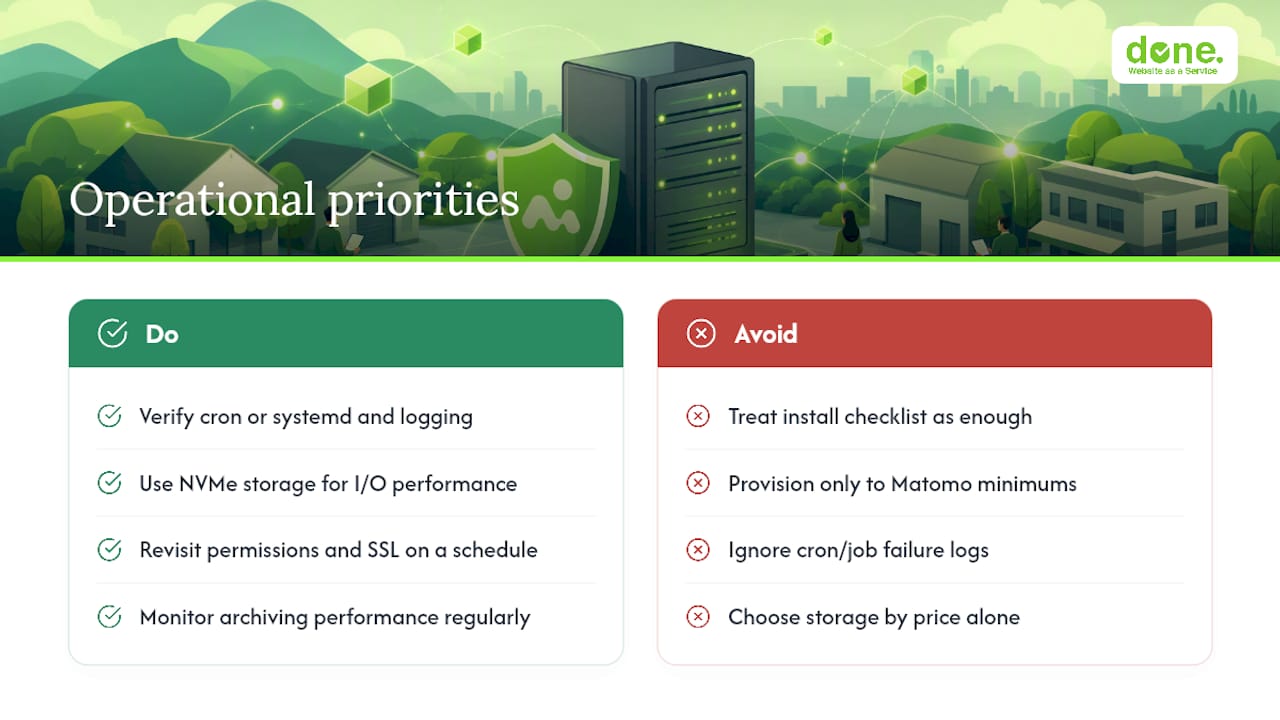
Here’s what conventional advice underplays: the hardware minimum Matomo publishes is genuinely just a floor. Teams that provision exactly to spec and nothing more tend to hit archiving slowdowns within a few months of real traffic, then blame the software rather than the disk. NVMe storage is not a luxury upgrade here. It’s the single lever that decides whether your dashboards feel current or permanently a day behind.
If you take one thing from this guide, prioritise the operational side over the install itself: get cron or systemd verified and logged before you trust a single report, and revisit your permissions and SSL setup on a schedule, not just once. That is where self-hosted Matomo either earns its reputation for data control, or quietly becomes another neglected server nobody wants to touch.
— Thomas
Get help installing and managing Matomo the right way
Done is the practical alternative to a DIY install for teams without a dedicated sysadmin. Rather than spending a weekend wrestling with cron jobs and file permissions, you get a Matomo instance that’s already configured correctly, from systemd archiving timers and automated backups to monitoring and GDPR-aware privacy defaults.

Done handles the setup, the SSL certificate, the ongoing patch cadence, and the monitoring that catches a stalled archive before it becomes a month of missing data. This fits businesses that want data ownership without taking on a second job managing infrastructure. Before reaching out, have your expected monthly pageviews and your current hosting details ready, that’s enough for Done to scope the work accurately. Visit Done’s website to start that conversation, or read more about what web development at Done actually covers if you’re weighing this against a wider site project. Reliable analytics also underpins the wider case for accurate reporting: better analytics investment tends to show up directly in marketing ROI.