

AI storage privacy for SMBs: 6 practitioner led steps to cut GDPR risk
September 3, 2026
Ecommerce ROI That Matches Your Bank for Lithuanian Stores
September 5, 2026
Use a Catch Hook when you need Zapier to receive events from a system that has no native integration, and use Send Webhook when Zapier needs to push data out to a service like an AI model’s API. For AI workflows specifically, the winning pattern is Catch Hook plus a background worker: acknowledge the incoming request in under a second, then run the AI processing separately so you never hit Zapier’s timeout. Watch three things closely: payload size, rate limits, and signature verification on anything handling real data.
TL;DR:
- Payloads must be kept small, shallow, and references used instead of raw files to prevent parsing errors and rate limit issues.
- Returning a quick 2xx acknowledgment and handling AI processing in a background worker avoids timeouts and duplicate charges.
- Proper use of idempotency keys and two-stage routing reduces duplicate AI calls and controls costs effectively.
- Signatures must be verified with HMAC, secrets stored securely, and full payloads redacted to ensure GDPR compliance and security.
- Common webhook failures often stem from incorrect URLs, disabled Zaps, payload errors, or size limits, which can be diagnosed via Zapier’s trigger history.
Table of Contents
- What a Zapier webhookai integration actually involves
- How do you set up and test a Zapier webhook for AI processing?
- Payload size and rate limits you need to design around
- Building reliable webhook to AI pipelines: what actually holds up in production
- Security and GDPR practicalities for production webhooks
- Why do Zapier webhooks fail, and how do you catch it fast?
- Done.lu’s view: when Zapier is right, and when it isn’t
- How Done can help you build this properly
- Sources
What a Zapier webhookai integration actually involves
A webhook is a small HTTP message a system sends automatically when something happens. No polling, no scheduled checks. A payment gateway fires one the moment a card is charged; a form tool fires one the second someone hits submit. Zapier calls its inbound listener Webhooks by Zapier, and it gives you three distinct modes worth knowing before you build anything.
Catch Hook parses the incoming JSON or form-encoded body automatically, splitting fields into something you can map straight into later steps. Catch Raw Hook skips that parsing and hands you the entire request body, headers included, which matters when you need to verify a signature against the exact bytes received. Send Webhook is the outbound direction: Zapier fires a request out to another URL, which is how you typically call an AI provider’s endpoint from inside a Zap.
Where this earns its place in a real stack:
- A contact form on a site with no direct Zapier app support, posting straight to a Catch Hook.
- A payment processor confirming a transaction, triggering a Zap that updates a CRM.
- An AI model’s asynchronous job finishing and calling back with the result, rather than Zapier sitting there waiting.
That last case is the one most people get wrong, and it’s exactly where AI workflows differ from a standard integration, as Zapier’s own documentation on triggering Zaps from webhooks sets out.
How do you set up and test a Zapier webhook for AI processing?
Building a Zapier webhookai flow follows a fixed sequence, and skipping steps is where most people burn hours later chasing a Zap that “sometimes doesn’t fire.”
- Create a new Zap and choose Webhooks by Zapier as the trigger app.
- Select Catch Hook (or Catch Raw Hook if you need to verify signatures on the raw body), then copy the generated URL.
- Send a test payload from Postman, curl, or the source system, and confirm Zapier picks up sample data.
- Map only the fields the next steps genuinely need. Do not pass entire files or documents through the payload.
- Have the sending system return a 2xx response the moment Zapier catches the hook, before any AI processing starts.
- Push the actual work, the AI model call, into a queue or background worker rather than running it inline in the Zap.
- Have the worker write results back to your database or trigger a follow up Zap once the AI response lands.
The reason step 4 matters as much as it does: OpenAI’s own webhook guidance recommends returning a fast acknowledgement and pushing heavy work to background processing, precisely because AI calls can take several seconds and webhook senders expect a quick response, not a wait for the model to finish thinking.
There’s a genuine trade-off between a serverless receipt pattern (a lightweight function that catches the hook, drops the event in a queue, and exits) and a persistent worker (always running, pulling from that queue). Serverless suits low, unpredictable volume. A persistent worker suits SMBs running AI classification or document processing on a steady daily flow, because it avoids cold-start latency on every single event.
Pro Tip: Never let the AI model call happen inside the Zap step itself if the model can take more than a few seconds to respond. Catch the hook, log it, hand it to a worker, and let the worker call the AI service. Your Zap history stays clean and your webhook sender never times out.
Payload size and rate limits you need to design around
Payload size is the constraint that trips up more AI integrations than anything else, because AI workflows tend to involve documents, images, or long text blocks that people instinctively want to send whole.
Zapier’s Catch Hook parses payloads up to a defined size, and anything larger, or anything with deeply nested structures, risks partial parsing or dropped fields. Raw hooks carry similar practical ceilings once you account for how much data a single Zap step can hold in memory. Zapier’s own webhook limits guidance is blunt about the fix: send references, not the file itself.
- Send a file URL or storage key, never the raw file bytes.
- Send an event ID and let the AI worker fetch full context from your own database.
- Keep nested JSON shallow. Flat structures parse more reliably than deeply nested ones.
- Batch cautiously. A burst of hundreds of events in seconds can throttle processing on legacy webhook routes.
A pattern worth naming as a design rule rather than an afterthought: the payload’s job is to say what happened and where to find the detail, not to carry the detail itself. Sending metadata (IDs, timestamps, URIs) instead of full documents means retries work cleanly too. Retrying a small JSON object costs nothing; retrying a 10MB payload repeatedly is how rate limits get hit.
Building reliable webhook to AI pipelines: what actually holds up in production
We’ve seen this pattern across several client automations at Done: the failure point is almost never the AI model itself. It’s what happens in the gap between “event received” and “AI result stored.”
Three practices separate a Zap that survives contact with real traffic from one that quietly drops events during a busy afternoon.
Acknowledge first, process second. Return a 2xx the instant the Catch Hook fires. Anything that makes the sender wait for the AI response invites a retry, and a retry on a slow endpoint is how duplicate processing starts.
Idempotency keys stop duplicate AI calls from duplicate webhooks. Use the webhook’s own event ID, or a webhook-id header where the sender provides one, as a deduplication key. Store recently seen IDs with a short time-to-live and reject anything you’ve already processed. This single habit, drawn directly from OpenAI’s webhook recommendations, prevents the most common source of AI billing surprises: the same document classified three times because a network blip triggered three retries.
Two-stage model routing controls cost. Run a fast, cheap classifier first to sort incoming events, then only route the genuinely complex cases to a stronger, pricier model. This cuts both latency and spend on high-volume AI workflows.
- Serverless functions suit spiky, low-volume event receipt.
- Persistent workers suit steady, higher-volume AI processing where cold starts add up.
Pro Tip: If you’re processing customer documents or support tickets through an AI step, log the event ID and processing outcome, never the document content itself, in your monitoring system. It keeps your audit trail useful without turning your logs into a second copy of sensitive data.
Security and GDPR practicalities for production webhooks
Getting a webhookai flow working is the easy half. Keeping it secure and defensible under a GDPR audit is where most SMB automations fall short, usually because nobody revisits the setup after the initial build.
- Verify every signature. Use HMAC verification (or JWKS where the sender supports it) on incoming payloads, and check the timestamp against a short window, rejecting anything older than a few minutes to block replay attacks.
- Store secrets in a vault, not in the Zap itself. Rotate webhook secrets on a defined schedule rather than leaving one in place indefinitely.
- Never log full payload bodies. Redact sensitive fields before anything reaches your monitoring tool.
- Enforce TLS 1.2 or higher on every endpoint, and use an IP allowlist or an API gateway in front of anything receiving sensitive data.
- Keep an audit trail. Log who accessed what, and when, for any Zap touching customer or financial data.
Production security guidance for Zapier webhooks handling regulated data points to constant-time signature comparison as a detail that’s easy to skip and genuinely matters, since naive string comparison can leak timing information an attacker could exploit.
On the compliance side, Zapier states it maintains SOC 2 Type II certification alongside GDPR-related controls, including SSO and access management for enterprise accounts. That covers Zapier’s own infrastructure. It does not cover what you send through it, so minimise personal data in every payload and keep a simple data map showing where customer information flows, since that document is usually the first thing a GDPR audit asks for.

Why do Zapier webhooks fail, and how do you catch it fast?
Most webhook failures trace back to one of four things, checked in this order:
- Wrong URL. Confirm the sender is posting to the exact Catch Hook URL Zapier generated, not an old one from a previous test.
- Zap is off. Sounds obvious, gets missed constantly, especially after an edit that silently paused the Zap.
- Empty or malformed payload. Check Zap history for what actually arrived, not what you assume was sent.
- Payload too large. Oversized or deeply nested bodies get dropped or partially parsed.
Zapier’s history log shows every trigger attempt and its outcome, which is your first stop for diagnosis. For anything running AI processing downstream, add a dead letter queue for events that fail repeatedly, and set up basic alerting so a silent failure doesn’t sit unnoticed for a week. Redacted logging plus a simple health metric (successful runs versus failures per day) gives you enough to track against an internal SLA without building anything elaborate.
Done.lu’s view: when Zapier is right, and when it isn’t
In our experience, Zapier is the right call for most SMBs prototyping an AI workflow. It’s fast to build, cheap to run, and good enough for moderate volume.
We move clients to custom infrastructure when volume gets genuinely high, or when an audit needs a stricter trail than Zap history provides. The underlying pattern stays the same either way: acknowledge, queue, process in a worker, log for audit. Only the plumbing changes.
— Thomas
How Done can help you build this properly
If you’ve read this far and are thinking “this is more plumbing than we have time for,” that’s the normal reaction, and it’s exactly the gap Done fills. We’re a Luxembourg-based digital and AI agency that’s shipped over 350 client projects since 2014, and webhook-to-AI automation is one of the jobs we get asked to fix most often, usually after someone’s in-house Zap starts dropping events under real traffic.

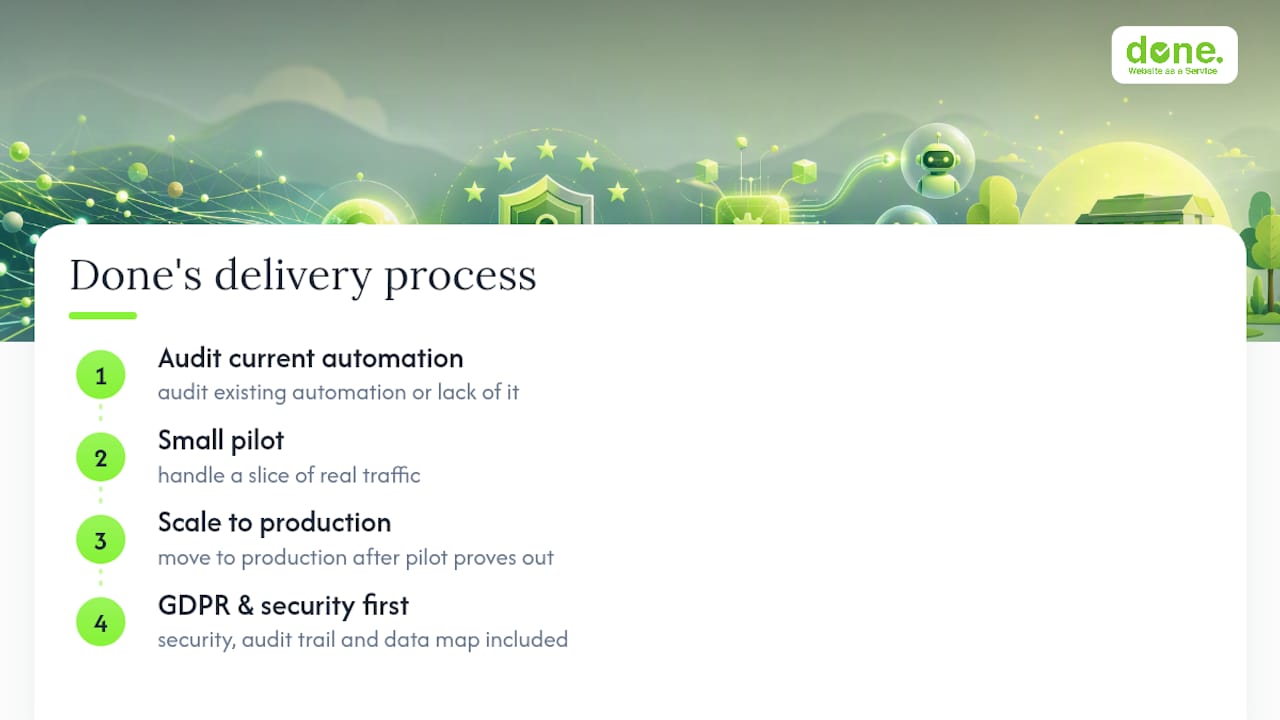
We start with an audit of your current automation (or lack of one), move to a small pilot handling a slice of real traffic, then scale into production once the pilot proves out. That covers workflow automation, AI tool implementation, and GDPR-compliant deployment for businesses handling regulated client data, legal, financial, or healthcare included. Unlike a generic automation freelancer, we build the security layer, the audit trail, and the GDPR data map into the pilot from day one, not as a retrofit once something breaks.
If your business is in Luxembourg or elsewhere in Europe and you want a webhook and AI pipeline that survives an audit as well as a Monday morning traffic spike, get in touch with Done and we’ll scope the pilot with you.
Sources
For implementation detail beyond this guide, see Zapier’s webhook trigger documentation, OpenAI’s webhook guide, and this marketing automation checklist for adjacent setup patterns.
- Trigger Zap workflows from webhooks
- Webhooks | OpenAI API
- Securing Zapier webhooks & secrets in PCI/HIPAA workloads