

SEM biudžeto planavimas: the formula and process that works
August 24, 2026
Duomenų suverenitetas AI diegimo metu: ką turi žinoti Lietuvos SVV
August 26, 2026
Run the old and new hosts in parallel, verify everything privately, then switch DNS only after a final delta sync. That sequence is what makes svetainės migracija be prastovų (website migration without downtime) actually possible, and it protects you from the two things that ruin a migration: a site that goes dark, and a database that loses the last hour of orders or form submissions.
Three things make or break the process:
- Lower your DNS TTL well in advance so the cutover propagates rapidly instead of over days.
- Run a private smoke test on the new host, under the real domain, before anyone else can see it.
- Sync the database last, right before cutover, so nothing typed in the final minutes gets lost.
Even with everything done right, expect a monitoring window of 48–72 hours. Some visitors’ DNS resolvers cache old records longer than others, so a slice of traffic may still hit the old server briefly. Keep it running. That overlap is a feature of the plan, not a bug.
Key Takeaways
Zero-downtime migration works when the old and new hosts run in parallel, DNS TTL is lowered days ahead, and the database syncs last, right before cutover.
| Point | Details |
|---|---|
| Lower TTL early | Drop DNS TTL 48–72 hours before cutover so propagation is fast, not delayed. |
| Test privately first | Use a hosts-file override or staging subdomain to verify logins, forms, and payments before going live. |
| Sync the database last | Run the final delta sync or a short write-freeze right before cutover to avoid lost orders. |
| Keep the old host live | Don’t decommission the previous server for at least 48–72 hours after cutover. |
| Map every redirect | Build a full 301 redirect map before launch to protect existing search rankings. |
| Get expert help if stakes are high | Done runs migrations with staged testing, GDPR-aware handling, and a short post-migration warranty. |
Table of Contents
- What causes downtime and data loss during a svetainės migracija be prastovų
- How do you migrate a website without downtime step by step?
- Which cutover method fits your site: DNS switch, reverse proxy or blue–green?
- What should you check in the first 48–72 hours after migration?
- What goes wrong most often, and how do you fix it fast?
- When should you hire an agency instead of doing it yourself?
- How Done.lu approaches migrations in practice
- Why the “just switch DNS and hope” approach keeps failing businesses
- Ready to migrate without the guesswork
- Where to go next for the technical detail
- Sources
What causes downtime and data loss during a svetainės migracija be prastovų
Most migrations don’t fail because of one big mistake. They fail because of small sequencing errors that compound.
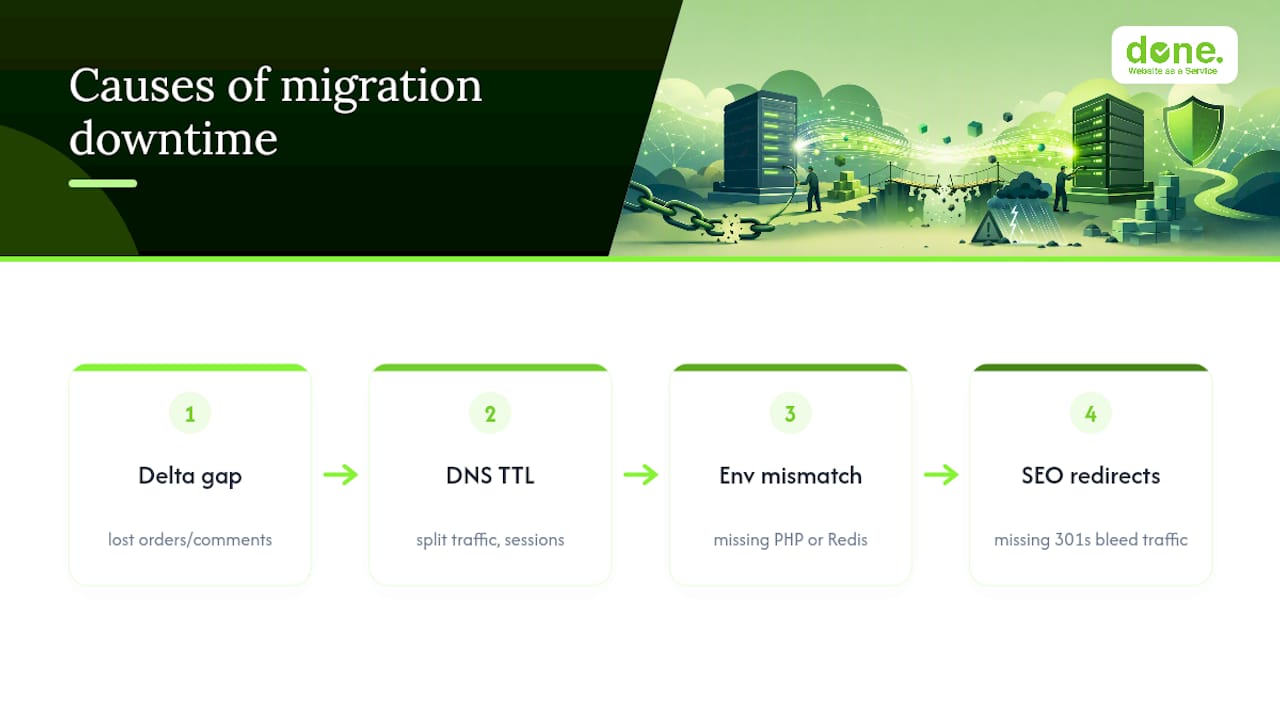
The delta gap is the most damaging one. If you export the database on Monday and switch DNS on Wednesday, every order, comment, or booking submitted in between vanishes from the new site. We’ve seen this with clients who assumed a single database copy was enough. It never is for anything with live user input.
Caching works against you if you ignore it. A DNS record with a 24-hour or 48-hour TTL means some visitors keep hitting your old server long after you’ve flipped the switch, while others land on the new one. That split creates inconsistent user sessions, broken carts, and support tickets asking why “the site looks different depending on the day.” Lowering the TTL to a short value well before cutover is the fix, and it needs to happen days ahead, not on migration morning.
Environment mismatches cause instant breakage. A different PHP version, a missing PHP extension, or a Redis instance that doesn’t exist on the new server will throw errors the moment traffic arrives. This is rarely subtle. Pages go blank or throw 500 errors within minutes of cutover.
Then there’s SEO. Migrations regularly wipe out months of search visibility because nobody mapped old URLs to new ones. Missing 301 redirects, an accidentally blocking robots.txt, or a forgotten sitemap submission can quietly bleed traffic for weeks after the technical side looks fine. Losing correct redirects is one of the leading causes of post-migration traffic loss, and it’s entirely preventable with an hour of planning.
How do you migrate a website without downtime step by step?
This is the sequence we use as the backbone for client migrations, adapted for scale but never skipped.
-
Provision the new host with matching environment settings. Same PHP version, same database engine and version, same extensions and modules. Issue the SSL certificate for the domain now, even though it won’t be live yet.
-
Run an initial full sync days before cutover. Copy every file with rsync and export the full database with a tool such as mysqldump. Document this as your baseline, so you know exactly what state the new host is in.
-
Lower the DNS TTL 48–72 hours ahead of cutover. Drop A and AAAA records to a short value, commonly 300 seconds, so resolvers pick up the shorter caching window before you actually switch. If you’re moving mail providers too, plan MX and TXT (SPF/DKIM) changes separately. Email routing has its own propagation timeline and shouldn’t be bundled into the same TTL change unless you’ve tested it.
-
Do a full private smoke test. Use a hosts-file override on a couple of testing machines, or a private staging subdomain, to load the real domain against the new server without exposing it publicly. Test logins, checkout, contact forms, file uploads, and confirm any CDN origin settings point correctly. This step alone catches the majority of environment problems before a single visitor is affected.
-
Run the final delta sync just before cutover. A last rsync catches any files changed since your baseline. For the database, either run a fresh import right before switching, or, for sites with heavy write traffic, apply a brief write-freeze of a few minutes so no order or submission is lost in the gap.
-
Switch DNS or update your CDN origin, then watch closely. Monitor access logs, error rates, and response times as traffic moves over. Keep the old host running and untouched. Nobody decommissions the previous environment on day one.
Pro Tip: Keep a plain-text rollback note next to your migration checklist with the old server’s IP address and DNS record values. If something breaks at 6pm on a Friday, you want to revert in under two minutes, not hunt through old emails.
Which cutover method fits your site: DNS switch, reverse proxy or blue–green?
Most small and medium sites don’t need anything exotic. A standard A/CNAME record switch, combined with a properly lowered TTL, handles the job at low cost and low complexity. This is the right call if you’re running a typical brochure site, blog, or SMB e-commerce store without heavy transaction volume.
A reverse proxy or load balancer in front of both hosts gives you a near-instant switch, because you control routing at the edge rather than waiting on DNS resolvers worldwide. This suits businesses that already manage their own routing layer or run behind a CDN with origin controls.

Blue-green deployment or gradual traffic-shifting belongs to high-traffic, transaction-heavy systems, usually paired with database replication so writes aren’t lost during the transition. It’s more infrastructure than most SMBs need, and it’s rarely worth the setup cost unless downtime genuinely means lost revenue by the minute.
Decide based on:
- How much traffic you’d lose per hour of inconsistency
- Whether you already run a CDN or edge layer
- Your team’s comfort with DNS versus proxy-level configuration
- Whether any SLA commits you to a specific uptime figure
For the vast majority of Lithuanian SMBs, the DNS approach done properly, with TTL discipline and a real smoke test, is enough.
What should you check in the first 48–72 hours after migration?
The cutover isn’t the finish line. The next three days matter as much as the switch itself.
-
Run acceptance tests on every core journey. Log in as a real user, complete a purchase, submit a contact form, upload a file. Do this on the live domain, not just staging.
-
Watch server access logs and analytics for the traffic shift. You should see requests moving from the old IP to the new one over the following hours. A flat line on the new server is a warning sign, not a coincidence.
-
Confirm email is actually arriving. Check MX records resolve correctly and that SPF and DKIM entries match the new sending infrastructure. Also check any third-party API whitelists that reference your old server’s IP address, since those silently break integrations.
-
Run a full redirect audit and resubmit your sitemap. Crawl both the old and new site structures, confirm every important URL has a working 301, and watch Google Search Console for crawl errors or sudden indexing drops over the following week.
What goes wrong most often, and how do you fix it fast?
- Propagation feels stuck. Confirm you actually lowered the TTL days in advance. If not, temporarily point DNS back to the old host while you correct it, rather than leaving visitors split between two environments.
- Pages return 500 errors or blank screens. Check the PHP version first, then missing extensions, then file permissions. This trio explains the vast majority of immediate post-cutover failures.
- Search traffic drops within days. Verify your 301 redirects are actually firing, check robots.txt hasn’t blocked crawling, and scan Search Console for new errors. Restore any missing redirects immediately rather than waiting for the next deploy window.
- Emails stop arriving. Recheck MX records, SPF and DKIM TXT entries, and confirm your CDN or proxy isn’t stripping mail-related headers at the origin.
When should you hire an agency instead of doing it yourself?
If revenue depends on uptime, if you’re running a dozen third-party integrations, or if you’re managing a multilingual site on a large CMS, this is not the moment to learn DNS propagation by trial and error.
Before hiring anyone, ask for a documented playbook, a written rollback plan, and references from a comparable migration. A short post-migration warranty period is a reasonable ask too. If a vendor can’t produce a written plan before the work starts, that’s your answer.
Done.lu typically runs migrations with staged private testing, GDPR-aware handling of client data during transfer, active monitoring through the cutover window, and a short warranty period afterwards to catch anything that slips through.
How Done.lu approaches migrations in practice
We treat every migration as a two-host problem, not a one-host problem. The old environment stays live and untouched until the new one has proven itself under real traffic, not just in a staging test.
Since 2014, Done has delivered over 350 client projects across Luxembourg and wider Europe, including website transfers for businesses in regulated sectors.
- Staged, private testing before any DNS change
- GDPR-aware handling of client and customer data during transfer
- Post-migration monitoring and a short warranty window
Why the “just switch DNS and hope” approach keeps failing businesses
Most migration disasters we’ve reviewed weren’t caused by exotic technical failures. They came from skipping a step that felt optional at the time, usually the TTL drop or the private smoke test, because the person doing the migration was confident the new host “should just work.”
That confidence is the problem. Environment parity issues, a missing PHP extension, a different Redis version, a stricter file permission setting, are invisible until real traffic hits them. A staging test on a different domain doesn’t catch what a hosts-file test under the real production domain does. The gap between “looks fine in staging” and “works under the actual domain with actual cookies and actual CDN routing” is where most SMB migrations quietly fall apart.
The other pattern we see constantly: business owners treat SEO preservation as a nice-to-have, something to fix “if traffic drops.” By the time traffic visibly drops, you’ve usually lost a week or more of ranking signal that takes months to rebuild. Redirect mapping takes an afternoon done properly. It should never be an afterthought, and it should never happen after cutover instead of before it.
The businesses that get through a migration cleanly aren’t the ones with the fanciest infrastructure. They’re the ones who refused to skip the boring steps.
— Thomas
Ready to migrate without the guesswork
Done handles website migrations the way we handle everything else: as a fixed, documented process rather than an improvised one. For a business owner who has just read through delta syncs, TTL timing, and rollback plans, that structure is the actual value, not another buzzword.

We provision the new environment with full parity to the old one, run private smoke tests before anything touches DNS, and keep your previous host live as a safety net until the new site has proven itself under real traffic. If your migration also involves a redesign or a platform change, our web development team scopes that alongside the transfer, so you’re not paying for two separate projects. Get in touch through Done to talk through your current setup and get a straight answer on timeline and risk before you commit to a date.
Where to go next for the technical detail
For the redirect and indexing side, a website audit checklist covers the SEO verification steps in more depth. Done’s own website launch checklist and SEO best practices guide cover the post-launch verification stage that follows any migration.
Sources
- Migrate Your Website to a New Host: Zero Downtime
- Kaip paleisti naują svetainę neprarandant SEO pozicijų