

Inbound vs outbound: a decision framework for SMEs
August 15, 2026
AI diegimo kaina Lietuvoje: 2026 m. biudžeto ir finansavimo gidas
August 17, 2026
A brandbook is the concise manual that defines a brand’s purpose, voice, and the exact technical rules designers and suppliers must follow. It documents everything from your logo’s clearspace to your colour palette’s HEX, RGB, CMYK, and Pantone codes, and specifies which typefaces, sourced from libraries such as Google Fonts, are authorised for use. If you work with external agencies, freelancers, or print suppliers, a brandbook is not optional — it is the single document that prevents every contractor from interpreting your brand differently.
Every business planning to grow or working with outside partners should create one. The core components are:
- Brand purpose, mission, and values
- Logo files with usage rules, clearspace, and forbidden variations
- Colour palette with HEX, RGB, CMYK, and Pantone codes
- Typography: primary and secondary typefaces with hierarchy rules
- Imagery and illustration style
- Tone of voice with example copy
- Templates: business cards, letterheads, social media posts
For a small business, an MVP brandbook covering logo files, three core colours with codes, one primary and one secondary typeface, and two template examples is enough to start. You can expand it as the business grows.
Key takeaways
A brandbook is the single most practical tool for keeping your brand consistent across every supplier, channel, and team member — and an MVP version is achievable in one to two days.
| Point | Details |
|---|---|
| Start with an MVP | Logo files, three colours with full codes, two typefaces, and two templates are enough to begin. |
| Document technical specs | Always include HEX, RGB, CMYK, and Pantone for every colour; supply SVG and PNG logo files as a minimum. |
| Publish and control access | Store in a shared cloud library with version control; never rely on a static PDF circulated by email. |
| Treat it as a living document | Schedule a 90-day review after launch and update whenever the brand strategy or product range changes. |
| Done’s brandbook service | Done delivers MVP and full brandbooks integrated with web projects, with clear timelines and no hidden fees. |
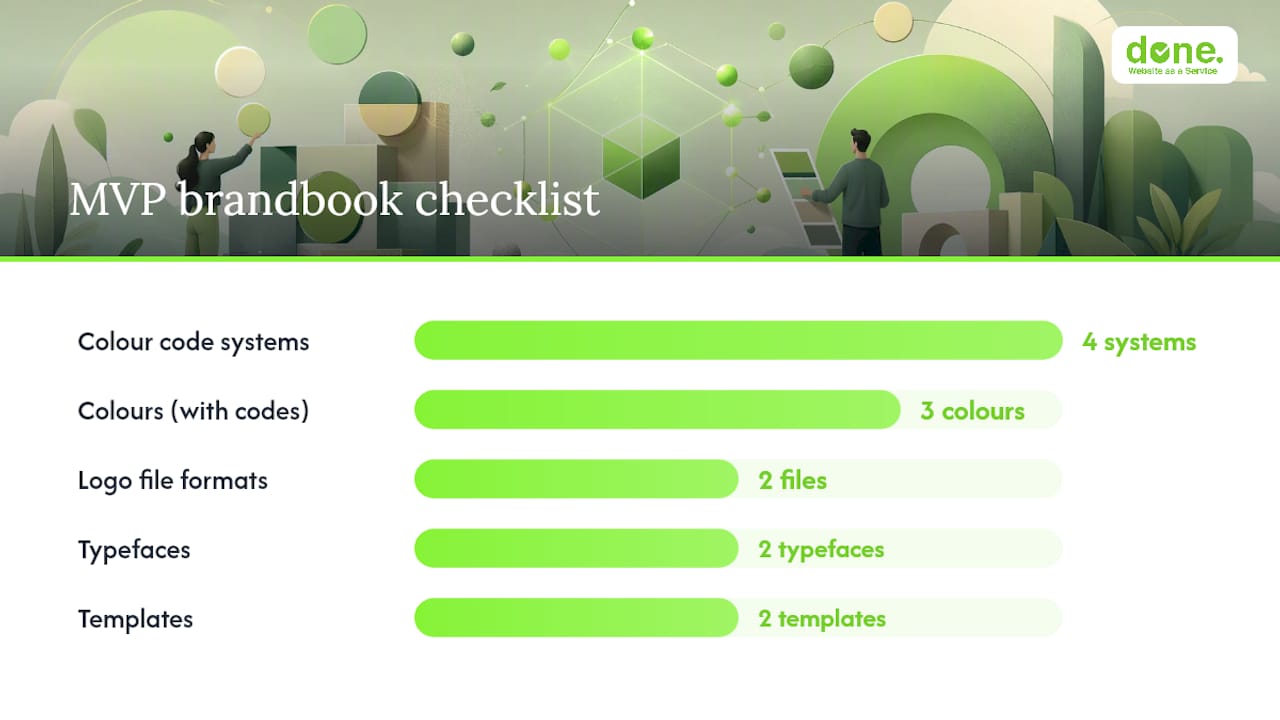
Table of Contents
- Why a brandbook matters for your business
- What does a brandbook contain?
- How to create a brandbook step by step
- How to roll out the brandbook and keep rules followed
- Where to find brandbook templates and examples
- Agency checklist, common mistakes, and Done’s experience
- What a brandbook is not — and when to update it
- Done’s approach to brandbook projects
- What to do next
- Sources
Why a brandbook matters for your business
Consistent branding builds recognition and trust, and it saves real money. A well-structured brand book reduces time wasted correcting inconsistent materials and gives every external partner a clear reference so they can work without repeated back-and-forth. The practical outcomes are direct:
- Brand recognition: customers see the same visual identity across every channel, which builds familiarity faster.
- Faster onboarding: new staff and agencies understand your brand in hours, not weeks.
- Fewer reprints: specifying CMYK values upfront means print jobs come back correct the first time.
- Cleaner agency briefs: a designer who receives a brandbook needs one briefing session, not five revision rounds.
Consider a concrete scenario: a business sends a logo to three different print suppliers without a colour specification. Each supplier interprets the brand colour differently. One prints it slightly too warm, another too cool. With a brandbook that states the Pantone reference and the CMYK breakdown, all three suppliers produce the same result. That is not a minor convenience — it is the difference between a coherent brand and a fragmented one.
Consistent branding also supports digital marketing performance. When every touchpoint looks and sounds the same, campaigns reinforce each other rather than confusing the audience.
What does a brandbook contain?
A functional brandbook must include these components — in this order — if you want designers and suppliers to apply it without guesswork.
Technical specifications for logos, colour codes, and typography are the core of any usable brandbook. Without them, the document is an inspiration board, not a working tool.
- Introduction and brand story — the company’s origin, purpose, and what it stands for.
- Mission and values — concise statements that guide tone and creative decisions.
- Logo — primary version, secondary version, monochrome variant, clearspace rules, and a list of forbidden uses (stretching, recolouring, placing on clashing backgrounds).
- Colour palette — every brand colour with all four code formats.
- Typography — typeface names, weights, hierarchy (H1 through body), and pairing rules.
- Imagery and illustration style — photography mood, subject matter, and what to avoid.
- Iconography — style, stroke weight, and approved icon sets.
- Tone of voice — personality descriptors and two or three example copy lines showing the brand in action.
- Templates — business cards, letterheads, email signatures, social media post formats.
- Digital considerations — SVG and responsive logo rules, web font references.
- Legal and partner usage rules — who may use the assets and under what conditions.
Colour specification example
Every colour in your palette needs a row like this. HEX is for screens; CMYK is for print; Pantone is for physical production where colour accuracy is critical, such as branded packaging or signage.
File formats and when to use them
Supply logo files in every format a supplier might need:
- SVG / AI — source files for designers; infinitely scalable.
- PDF — for print-ready documents and presentations.
- PNG — for digital use where transparency is needed.
- JPG — for web images where file size matters and transparency is not required.
Practitioners recommend supplying both source files (AI/SVG) and ready-to-use exports (PNG/JPG/PDF) with a short usage example so non-design staff can verify which file to use in which context.
Pro Tip: Choose typefaces available on Google Fonts wherever possible. They are free to use on web projects, require no separate licence management, and can be referenced directly in your brandbook with a URL, so any developer or designer can implement them immediately.
How to create a brandbook step by step
Follow these steps to produce a practical brandbook, whether you are doing it internally or briefing an agency.
- Audit existing assets. Collect every logo file, colour reference, and font currently in use. Identify inconsistencies.
- Define brand essence and positioning. Write a one-paragraph brand story, a mission statement, and three to five values. This feeds the introduction section.
- Draft the visual system. Finalise logo variants, build the colour palette with all four code formats, and select typefaces. For an SMB, one primary and one secondary typeface is sufficient.
- Write tone of voice and sample copy. Describe the brand’s personality in three adjectives, then write two example headlines and one example social media caption that demonstrate it.
- Compile templates. Produce at least a business card, a letterhead, and one social media post template. These are the most-used assets in daily operations.
- Test with one real campaign. Apply the brandbook rules to a live piece of communication before publishing the document. Gaps become obvious immediately.
- Publish and share. Upload to a shared cloud folder or asset management system. Notify all staff and external partners.
MVP checklist for small businesses
The absolute minimum for an SMB brandbook:
- Primary logo file in SVG and PNG
- Three core brand colours with HEX, RGB, CMYK, and Pantone codes
- One primary typeface and one secondary typeface with weights specified
- Two template examples (business card and social media post)
An MVP takes one to two days of internal effort to produce. A full brandbook with a professional agency typically runs two to four weeks. The brandbook should be treated as a living document — plan a review at 90 days and annually thereafter. Version control guidance is covered in the next section.
For a structured approach to the broader branding strategy that feeds into a brandbook, Done’s step-by-step guide covers the full process.
How to roll out the brandbook and keep rules followed
A brandbook is only useful if people can find and apply it. A PDF buried in someone’s email archive does not count as a published brandbook.
Practical rollout actions:
- Central asset library: store all files in a cloud folder (Google Drive, Dropbox, or a CMS media library) with a clear folder structure.
- Short training session: a 30-minute walkthrough with staff covers 90% of daily application questions.
- Supplier brief template: create a one-page document that points external partners to the brandbook and lists the key rules they must follow.
- File naming conventions: use consistent naming (e.g.
brand-logo-primary-v2.svg) so the correct file is always obvious. - Permission levels: give internal staff read/write access; give external agencies read-only access to prevent accidental overwrites.
- Update schedule: review the brandbook quarterly for the first year, then annually.
Living documents reduce confusion and ensure the team always uses the latest assets. Static PDFs fail because they get forwarded, saved locally, and forgotten — the version in circulation is rarely the current one. A single source of truth in a shared portal, with a concise change log noting what changed and when, solves this.
Pro Tip: Set two permission levels in your asset library: internal team members get edit access to templates; external agencies get view-only access to source files. This prevents accidental overwrites while keeping assets accessible.
Where to find brandbook templates and examples
Templates speed up delivery. Choose one that matches your company size and the volume of assets you actually produce.
- Mini (one page): a single-page rules sheet covering logo, colours, and typefaces. Suitable for sole traders and very early-stage businesses. Canva and Figma both offer free one-page brand sheet templates.
- Medium (10–20 pages): covers all core components plus two or three template examples. The right scope for most SMBs.
- Full (30+ pages): includes comprehensive usage examples, photography direction, iconography, and partner usage rules. Appropriate for organisations with multiple product lines or large supplier networks.
Useful resources to inspect before building your own:
- Google Fonts for selecting and referencing web-safe typefaces with clear licensing.
- The Vilnius Tourism brandbook PDF — a publicly available full-scale example showing layout, asset lists, and technical specifications.
- Issuu’s Nike Football brandbook — a large-format example useful for understanding how a full brandbook structures photography, typography, and usage rules at scale.
- Figma Community templates — search “brand guidelines” for free, editable starting points.
When adapting a template, check the licence terms, replace every placeholder with a real example from your own brand, and remove any section that does not apply to your business type. A restaurant’s brandbook should include table setting and menu format examples; a retail business needs receipt and label templates.
For branded digital touchpoints, QR code colour specifications are worth including in the digital section of your brandbook, particularly if you use QR codes in print materials.
Agency checklist, common mistakes, and Done’s experience
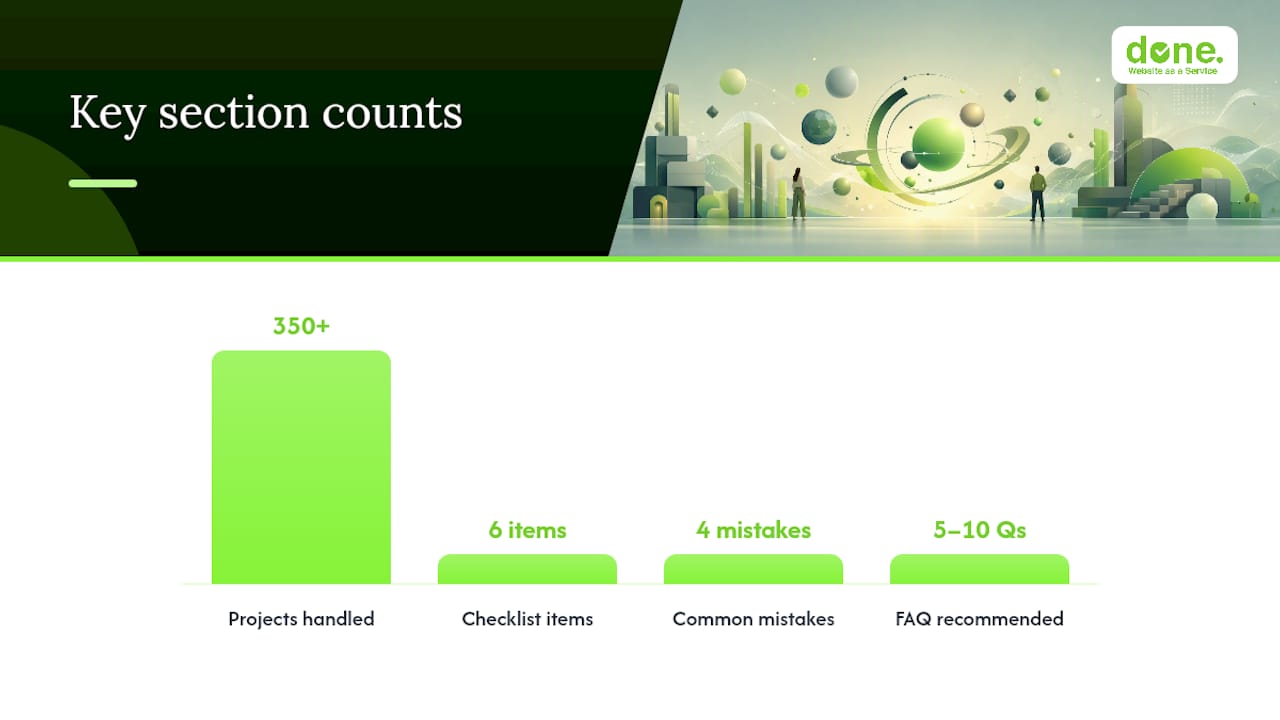
Before handing assets to a client, we check every item on this list. In our experience with 350+ projects, the mistakes that cause the most rework are almost always the same ones.
Agency hand-off checklist:
- Final logo files in SVG, AI, PDF, PNG, and JPG
- Colour sheet with HEX, RGB, CMYK, and Pantone for every brand colour
- Typography: Google Fonts links or licensed font files with usage rights confirmed
- Template master files (editable, not flattened)
- Usage examples showing correct and incorrect applications
- Named contact for brand questions
Most common mistakes we see:
- Missing CMYK values — the designer only supplies HEX, and the print supplier has to guess.
- Inconsistent logo clearspace — the logo appears too close to other elements in some materials and correctly spaced in others.
- Unlicensed fonts — a typeface was purchased for one user and then shared across a team, violating the licence.
- Static PDFs locked in email — no one can find the current version, so contractors use whatever they saved six months ago.
As Brandfolder notes, combining a brand book (context and inspiration) with brand guidelines (rules and technical assets) gives teams both purpose and the practical means to apply the brand consistently. The distinction matters: a brand book explains the why; brand guidelines explain the how. Both together are what make a brandbook genuinely usable rather than decorative.
Building a brandbook early — even a simple one — prevents the ‘chaotic brand’ syndrome where every contractor produces a slightly different version of your identity. We have seen this pattern repeatedly: a business waits until it has ten suppliers before creating a brandbook, then spends weeks correcting inconsistent assets. Starting with an MVP during growth is always cheaper than fixing the damage later.
Pro Tip: Ask your agency to deliver a short “brand usage FAQ” alongside the brandbook — five to ten common questions with answers. This single document cuts the number of brand-related support queries from new staff and suppliers by a significant margin.
What a brandbook is not — and when to update it
A brandbook is not a mood board, a logo file folder, or a one-time deliverable. Businesses sometimes confuse a collection of design assets with a brandbook, or treat the document as finished once it is printed. Neither approach works.
A brandbook is also not a substitute for a brand strategy. The strategy defines where the brand is going; the brandbook documents how it looks and sounds right now. If the strategy changes — a new market, a rebrand, a product pivot — the brandbook must be updated to reflect it.
Update triggers worth scheduling:
- A new product line or service category is launched.
- The business enters a new market or language.
- A visual refresh is applied to the logo or colour palette.
- A new digital channel (a new social platform, a new website) requires format guidance that the current document does not cover.
Done’s approach to brandbook projects
Done delivers brandbooks as a concrete output, not a side note to a web project. For SMBs that need a fast, usable result, the starting point is an MVP package: logo file set, colour sheet, typography specification, and two template masters, delivered within one to two weeks.
For businesses that need a full brand identity guide, Done builds the complete document — brand story, visual system, tone of voice, template library, and a supplier usage brief — integrated directly into the web project so the website and the brandbook share the same assets from day one. That integration, covered in Done’s web design and branding approach, removes the gap between what the brandbook specifies and what the website actually delivers.
Service options:
- MVP brandbook: logo files, colour codes, typefaces, two templates. Delivered in one to two weeks.
- Full brandbook: all components, usage examples, supplier brief, template library. Delivered in two to four weeks.
- Ongoing asset management: brandbook updates, new template creation, and web integration as the business grows, available as part of a Website as a Service subscription.
To start, submit a brief or book a short discovery call via Done. The first conversation covers your current assets, your supplier situation, and which package fits your timeline.
What to do next
If you have read this far and still do not have a brandbook, the one action worth taking this week is to open a shared folder, drop in your best logo file, write down your three brand colours with their HEX codes, and name your typefaces. That is your MVP. It takes less than two hours and immediately gives every supplier a reference point.
From there, the 90-day branding action plan at Done covers how to build on that foundation systematically — without a large budget or a dedicated design team.
This article provides general information about brandbook creation and brand identity documentation. For advice specific to your business situation, consult a qualified branding or design professional.
Sources
- Kaip sukurti brandbook‘ą? | Verslo sparnai
- Kas yra brandbook‘as ir kodėl jis svarbus verslui? – Verslas Blog
- A Brand Guide vs. Brand Book
- Fonts