

Optimizely vs VWO: which A/B testing tool fits your team?
August 6, 2026
Unbounce vs Instapage: best pick for paid campaigns 2026
August 8, 2026
TL;DR:
- Pick Pipedrive if your main goal is improving sales follow-up and pipeline management.
- Choose HubSpot if your team requires shared marketing, sales, and customer service data in one platform.
Pick Pipedrive if your primary problem is sales execution. Pick HubSpot if you need marketing, sales, and service teams sharing one data layer. That is the verdict from our hands-on testing and from auditing CRM deployments across Luxembourg and Central Europe.
Choose Pipedrive if:
- Your team is sales-led and follow-up discipline is the main gap
- You want predictable per-seat pricing with no mandatory onboarding fees
- You need to be live and productive within a week
Choose HubSpot if:
- Marketing and sales must share contacts, campaigns, and reporting
- You plan to run email nurturing, landing pages, or multi-step automation
- You can absorb higher setup costs and a longer configuration period
Table of Contents
- How HubSpot and Pipedrive compare side by side
- Feature-by-feature breakdown: what actually matters for Central Europe SMBs
- How to choose between HubSpot and Pipedrive for your SME
- What migration and implementation actually look like
- Done’s hands-on verdict for Luxembourg and Central Europe SMBs
- Key takeaways
- What we have seen go wrong with Central Europe SMBs
- Done can help you choose, migrate, and get it right
- Sources and further reading
How HubSpot and Pipedrive compare side by side
Pipedrive vs. HubSpot: Which CRM is best? consistently frames the split the same way: HubSpot is a cross-functional customer platform; Pipedrive is purpose-built for sales execution.
| Dimension | Pipedrive | HubSpot |
|---|---|---|
| Primary focus | Sales pipeline and activity management | Integrated marketing, sales, and service |
| Ideal use-case | Sales-led SMB, simple stack | Multi-team, marketing-driven growth |
| Pricing model | Per seat, 4 tiers (Lite/Growth/Premium/Ultimate) | Per seat per Hub + contact tiers |
| Solo user (entry tier, EUR approx.) | — | Free CRM (limited); Starter — |
| 5-seat sales team (mid tier, EUR approx.) | — | Sales Hub Starter —; Professional — |
| — | — | Sales + Marketing Hub Professional: €2,000+/mo |
| Ease of setup / time-to-value | Fast (days) | Moderate to slow (weeks to months) |
| Pipeline management | Visual, activity-based, strong | Good, less opinionated |
| Marketing automation | Add-on only, limited | Core strength (Marketing Hub) |
| Reporting and forecasting | Solid mid-tier; deep at Premium | Deep, but requires Professional tier |
| Integrations and API | Adequate sales-centric connectors | Several hundred certified integrations |
| AI features | Pipedrive Pulse (pipeline prioritisation) | Breeze AI (content, conversation, data extraction) |
| GDPR / data residency | EU hosting available; standard DPA | EU hosting available; SCCs and DPA documented |
| Support and onboarding | Email/chat; no mandatory onboarding fee | Tiered; mandatory onboarding fee at Professional+ |
| Scalability / TCO | Predictable; add-ons for extra quota | Costs escalate sharply at Professional tier |
Quick scores (ease of use / value for money / scalability):
Pricing examples are indicative based on published list prices. Actual EUR amounts depend on billing cycle, regional promotions, and add-on selections.
Feature-by-feature breakdown: what actually matters for Central Europe SMBs
Pipeline and activity management
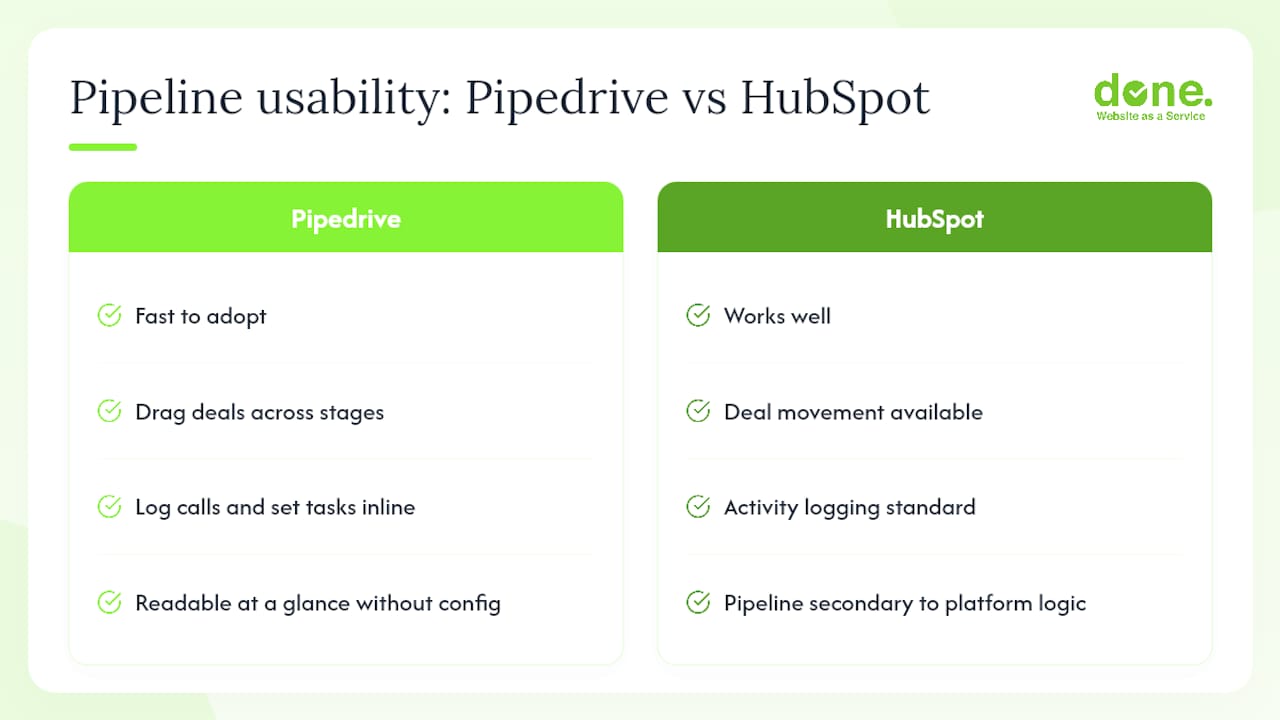
Pipedrive’s visual pipeline is genuinely fast to adopt. Reps drag deals across stages, log calls, and set follow-up tasks without navigating away. Hands-on testing confirms that sales managers can read their pipeline at a glance without any dashboard configuration. HubSpot’s pipeline works well but feels secondary to its broader platform logic.
Marketing automation
This is where the platforms diverge most sharply. HubSpot’s Marketing Hub handles email sequences, landing pages, forms, and lead scoring natively. Pipedrive offers basic email automation but nothing close to a full marketing automation stack. If you are running inbound campaigns, HubSpot is the practical choice.
Reporting and forecasting
Advanced reporting in HubSpot typically requires Sales Hub Professional, which sits at a materially higher price point than entry tiers. Pipedrive’s mid-tier plans include solid forecasting and activity reports that cover most SMB needs without an upgrade.
AI features
HubSpot’s Breeze AI spans content generation, conversation intelligence, and data extraction across hubs. Pipedrive’s AI, branded as Pulse, focuses on pipeline prioritisation and deal summaries. For a sales team that wants AI to flag which deals need attention, Pipedrive is sufficient. For teams that want AI across marketing copy, chat, and CRM enrichment, HubSpot has the broader toolkit.
GDPR and data residency
Both platforms offer EU data hosting and standard Data Processing Agreements. For Central Europe deployments, capture the vendor’s subprocessor list and Standard Contractual Clauses (SCCs) during procurement and record them in your Data Protection Impact Assessment (DPIA) where required. Neither platform is a compliance risk by default, but the documentation work falls on you.
Pricing: the 12-month cost trap
| Scenario | Pipedrive (EUR/yr approx.) | HubSpot (EUR/yr approx.) |
|---|---|---|
| Solo user, entry tier | — | Free CRM or — (Starter) |
| — | — | €24,000+ (Sales + Marketing Hub Professional) |
Pipedrive’s add-on and top-up structure means extra quotas (email sends, automations) carry additional monthly costs that follow your billing cycle. HubSpot’s per-seat billing model, introduced in 2024, plus mandatory onboarding fees at Professional tier, can push first-year costs well above the list-price headline.
Pro Tip: Model your 12-month cost at the Professional-equivalent feature set, not the entry tier. Most SMBs hit functional limits within three months and upgrade, at which point onboarding fees and contact-tier costs appear. Independent reviews strongly advise this approach to avoid budget surprises.
How to choose between HubSpot and Pipedrive for your SME
Decision checklist
- Define your primary objective — Is it sales follow-up discipline, or shared marketing and sales data? Sales-only points to Pipedrive; shared data points to HubSpot.
- Count your active contacts — HubSpot’s Marketing Hub bills by contact tier. If you have a large list, model that cost before committing.
- List your must-have integrations. Check both marketplaces against your accounting, ERP, or e-commerce tools. HubSpot’s broader integration ecosystem matters if you run a complex stack.
Vendor questions to ask in a demo
- What is the mandatory onboarding fee for the tier we are evaluating, and what does it include?
- How are AI credits metered, and what happens when we exceed the allocation?
- Who owns the data if we cancel, and what is the export process?
- How does contact billing work if our list grows by 50% mid-year?
- Which local integrations (e.g. Sage, DATEV, Odoo) are certified versus community-built?
Red flags in proposals
- Onboarding fees buried in a footnote rather than itemised in the quote
- Contact billing described as “based on your database size” without a worked example
- Local integrations listed as “available via Zapier” when you need a native connector
Pro Tip: Build a simple pricing estimate: (seats × monthly rate × 12) + onboarding fee + (estimated add-on costs × 12) + contact-tier uplift. Run it at entry tier and at the next tier up. The gap between those two numbers is your real budget risk.
What migration and implementation actually look like
Migration checklist
- Export all contacts, companies, deals, and activity history from your current system
- Map fields before import (custom fields rarely translate one-to-one)
- Deduplicate records before migration, not after
- Sync email accounts and test send/receive in a staging environment
- Run a parallel test cycle of at least one week before switching off the old system
Typical timelines and cost bands (Central Europe, EUR)
| Migration complexity | Timeline | Typical cost band (EUR) |
|---|---|---|
| Simple (contacts + deals, no custom fields) | 1–3 days | €500–€900 |
| Medium (custom fields, email sync, 1–2 integrations) | 1–2 weeks | — |
| Complex (multi-hub, legacy data, multiple integrations) | four to eight weeks | — |
Cost bands reflect typical agency or consultant fees in Central Europe; internal effort is additional.
GDPR checklist for procurement
- Request the vendor’s DPA and subprocessor list before signing
- Confirm EU data hosting region and failover location
- Verify SCCs are in place for any US-based subprocessors
- Record processing activities in your DPIA or Records of Processing Activities (RoPA)
- Confirm data export and deletion procedures meet your retention policy
Both platforms offer self-service onboarding documentation. HubSpot’s HubSpot Academy is extensive; Pipedrive’s knowledge base is leaner but sufficient for standard deployments. Paid onboarding from either vendor accelerates time-to-value but adds cost, particularly for HubSpot Professional where it is mandatory.
Pro Tip: For GDPR-compliant automation, document your controller/processor relationship with the CRM vendor at the point of contract, not retrospectively. Retrofitting a DPIA after go-live is significantly more work.
Done’s hands-on verdict for Luxembourg and Central Europe SMBs
We have audited and implemented CRM platforms for clients across Luxembourg and the broader Central Europe region. Two profiles come up repeatedly.
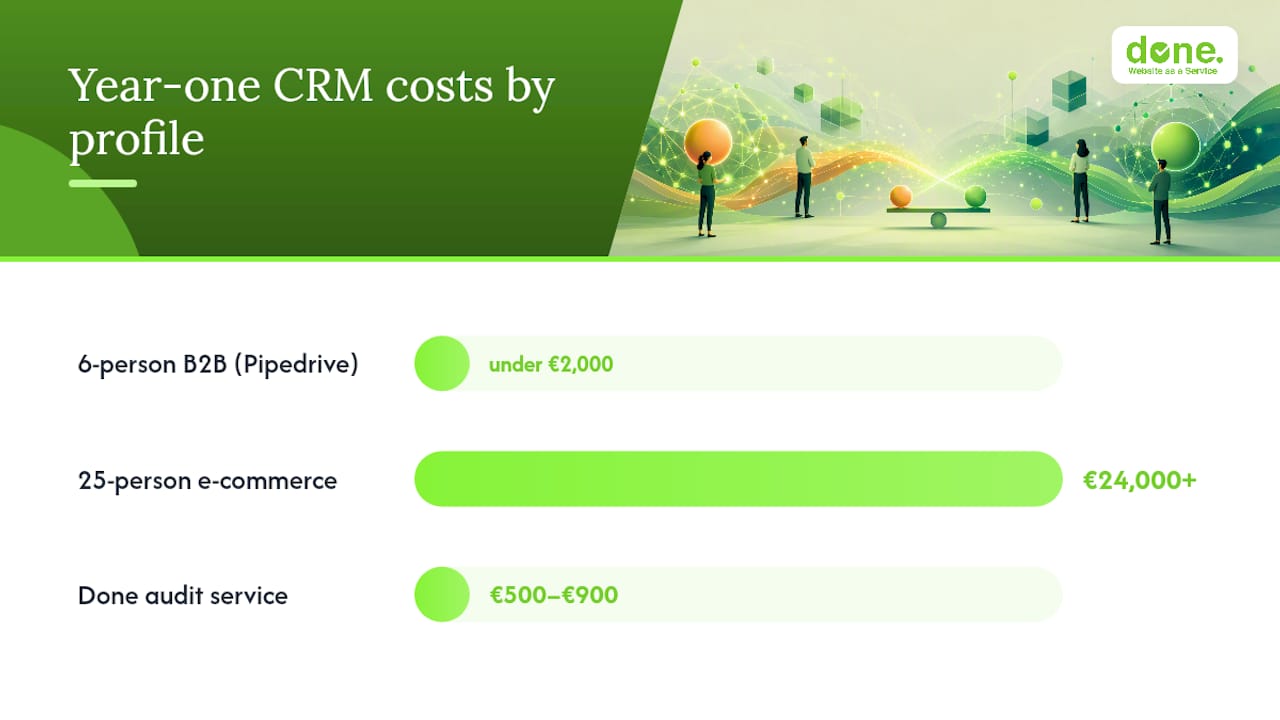
Profile A: a 6-person B2B services firm. The team was missing follow-ups, had no pipeline visibility, and needed to be productive fast. We recommended Pipedrive. They were live in four days, and pipeline coverage improved within the first month. Total year-one cost: under €2,000 including setup support. If you recognise your business in this profile, check whether a sales CRM is the right next step.
Profile B: a 25-person e-commerce business. Marketing, sales, and customer service all needed shared contact data, and the team was running email campaigns manually. HubSpot was the right call, but the year-one cost including onboarding and Marketing Hub Professional came to €24,000+ as modelled in the pricing table. They knew this going in because we modelled it upfront.
Our recommendation by profile:
- Sales-led SMB, under 15 seats, limited admin capacity: Pipedrive Growth or Premium
- Multi-team SMB with active marketing campaigns: HubSpot Sales + Marketing Hub Starter to start, Professional when volume justifies it
- Hybrid stack (Pipedrive for sales, HubSpot for marketing): possible via marketplace integration, but adds governance complexity
Done’s CRM audit service covers your current workflow, seat count, integration requirements, and a 12-month cost model for both platforms. Typical scope is 90 minutes plus a written report. Price band: €500–€900. The output is a migration plan, a POC checklist, and a clear recommendation you can take to your board.
Pro Tip: Before any demo, map your 90-day sales workflow on paper: lead source, qualification step, proposal stage, close, and first follow-up. That map tells you immediately whether you need a sales-execution tool or a platform CRM.
Key takeaways
For most Luxembourg SMBs, the deciding factor is scope: Pipedrive wins on speed and cost for sales-led teams; HubSpot wins when marketing and sales must share one platform.
| Point | Details |
|---|---|
| Sales-only teams: choose Pipedrive | Faster setup, predictable per-seat pricing, no mandatory onboarding fee. |
| Multi-team growth: choose HubSpot | Marketing Hub handles email, automation, and lead scoring natively across teams. |
| Model 12-month costs, not entry price | Professional-tier upgrades and onboarding fees can multiply year-one spend significantly. |
| GDPR: document at procurement | Request DPA, subprocessor list, and SCCs before signing, then record in your RoPA. |
| Done’s audit: next step | A 90-minute CRM audit (€500–€900) delivers a cost model and migration plan for your profile. |
What we have seen go wrong with Central Europe SMBs
The most common mistake is choosing HubSpot because it looks impressive in a demo, then discovering that Professional-tier features, which are what made it impressive, cost three to five times the entry price. We have seen this with clients who signed on the Starter plan expecting full automation, then faced a significant upgrade cost within six months.
The second pattern is underestimating admin effort. HubSpot’s configurability is a strength, but for a team of five with no dedicated ops person, it becomes a governance burden. Pipedrive’s opinionated structure, which some buyers see as a limitation, is often exactly what a small team needs to stay disciplined.
A third warning: platform fatigue. One client, a 12-person professional services firm, implemented HubSpot with all four hubs active. Within a year, two hubs were unused and the team had reverted to spreadsheets for parts of the workflow. We helped them consolidate to Sales Hub only and integrate a separate email tool, which cut their annual licence cost and improved adoption.
The fix in each case was the same: audit the actual workflow before choosing the platform, not after.
Done can help you choose, migrate, and get it right
Choosing between two capable CRM platforms is straightforward when you have the right cost model and a clear workflow map. Done’s CRM audit and proof-of-concept service gives Luxembourg SMBs exactly that: a 90-minute structured session, a written cost comparison for both platforms at your seat count and feature requirements, and a migration checklist you can act on immediately.
Done brings GDPR competence, local language support (French, German, English, Luxembourgish), and practical AI integration experience to every CRM project. There are no hidden fees and no vendor bias: the recommendation is based on your workflow, not on which platform pays a higher referral margin.
To request your 90-minute CRM audit, visit Done’s digital consulting service or contact the team directly at done.lu. Slots are limited to four audits per month to maintain quality.
Sources and further reading
| Source | What it covers |
|---|---|
| Pipedrive vs. HubSpot: Which CRM is best? (Zapier) | Platform scope, AI feature differences, and hands-on testing notes |
| How does pricing work in Pipedrive? | Pipedrive’s four-tier pricing structure, add-ons, and top-up policy |
| HubSpot Pricing (Chatarmin) | HubSpot per-seat billing, onboarding fees, and Marketing Hub cost drivers |
| HubSpot vs Pipedrive: CRM, Integration, and Migration (CRMPickers) | Decision guidance on platform CRM vs sales-focused CRM; integration footprint |
| Pipedrive vs. HubSpot: Features, Pricing, and AI (monday.com) | Side-by-side feature distinctions, ideal customer profiles, integration counts |
| Pipedrive vs HubSpot: Which CRM Is Right for You? (Avoma) | Ease of use, time-to-value, and the case for modelling Professional-tier costs |
| Pipedrive app for HubSpot (HubSpot Marketplace) | Integration options for hybrid Pipedrive + HubSpot stacks |
| GDPR-compliant automation for SMEs (Done) | Practical GDPR steps for CRM and marketing automation deployments |
| 5 signs your business needs a sales CRM (Done) | Checklist for deciding when to adopt a sales CRM |