

CRM integracija su AI: praktinis planas SMB
August 19, 2026
SEO paslaugų kaina: kiek biudžeto reikia verslui
August 21, 2026
Choose a cloud SaaS CRM with a simple sales pipeline and native email or accounting integrations. That single decision resolves most of the guesswork in CRM pasirinkimas smulkiai įmonei for a small firm with under fifty staff. Skip on-premise servers, skip full ERP suites, and skip anything that needs a developer to set up a contact form.
For your first trial round, stick to three categories: an entry-level sales-first CRM, a freemium all-in-one platform, or a support-focused ticketing tool, depending on whether your bottleneck is sales, marketing, or customer service. GDPR compliance and a clear data processing agreement are non-negotiable at this stage, not an afterthought for later.
Your immediate next step: book two vendor demos this week and run them against the checklist in section five.
Key Takeaways
The right CRM for a small business is a cloud SaaS tool matched to one clear process, rolled out through a short pilot with GDPR checks completed before go-live.
| Point | Details |
|---|---|
| Start with process, not software | Map your sales or service workflow before comparing any vendor. |
| Default to cloud SaaS | On-premise and ERP-integrated CRMs only make sense with dedicated IT and clear justification. |
| Run a tight pilot | Two power users, one automated workflow, and real data over two to four weeks. |
| Verify GDPR basics on every call | Confirm a signed DPA, hosting location, and data deletion process before buying. |
| Get expert support for rollout | Done offers requirements audits, migration, GDPR review, and hands-on training for SMB CRM projects. |
Table of Contents
- What a CRM actually does for a small company
- Cloud vs on-premise, and CRM-only vs ERP-integrated
- How do you work out what your business actually needs?
- What should you ask on every CRM demo call?
- Which CRM systems are commonly recommended for small businesses?
- What does a realistic CRM rollout plan look like?
- What GDPR and security checks matter before you sign?
- What should CRM pricing and rollout timelines actually cost?
- Frequently asked questions
- Sources
What a CRM actually does for a small company
A CRM is a central system that records every customer contact, conversation, and follow-up in one place, replacing scattered spreadsheets and inboxes. That is the whole idea. Everything else is detail.
For a company with a small number of employees, the benefits show up fast once the tool is actually used:
- Sales pipeline clarity — you see every open deal, its stage, and who owns it, instead of guessing from memory.
- Reduced admin time — no more copying contact details between email, spreadsheets, and invoicing tools.
- Faster response times — automated reminders mean leads don’t sit untouched for three days.
- Better cross-sell and renewal timing — past purchase history sits next to the contact record, so upsell conversations happen at the right moment.
None of this happens automatically. A CRM organises a sales process; it doesn’t invent one. Practitioner guides consistently warn that automating a badly defined process just accelerates the mess, so fix your workflow before you digitise it.
Pro Tip: Improving your follow-up cadence, even manually, before you buy anything, gives you a baseline conversion rate to measure the CRM against later. Without that baseline, you’ll never know if the tool actually helped.
Cloud vs on-premise, and CRM-only vs ERP-integrated
Most small businesses should default to cloud (SaaS) CRM. It needs no server, updates itself, and you’re running within days. On-premise systems still exist, mostly in regulated sectors that must keep data on their own infrastructure, but they demand IT staff and upfront hardware spend that rarely makes sense below fifty employees. Hybrid setups, where sensitive records stay local and the rest lives in the cloud, sit in between.
The second decision is whether you need a CRM-only tool or a CRM bolted onto a wider ERP suite. Official guidance on choosing business management software recommends mapping your actual needs before comparing ERP and CRM trade-offs, rather than buying the biggest suite available.
| Model | Setup speed | Cost profile | Best suited to |
|---|---|---|---|
| Cloud CRM (SaaS) | Days | Low, predictable monthly fee | Sales-focused SMBs with no dedicated IT |
| On-premise CRM | Weeks to months | High upfront, ongoing maintenance | Firms with strict local hosting requirements |
| ERP-integrated CRM | Months | High, needs consultants | Companies already running ERP for inventory or finance |
Pro Tip: Pick the simplest model that covers your core sales or service process, and postpone deep ERP integrations until the CRM habit has actually stuck. Adoption risk rises sharply with every extra system you connect on day one.
How do you work out what your business actually needs?
Before any vendor call, spend an afternoon mapping your own operation. Academic research on CRM selection for small firms points to functional fit, user convenience, and total cost, including implementation and support, as the criteria that decide whether a project succeeds.
- List your users and roles. Who touches customer data daily: sales, support, a solo owner wearing both hats?
- Map your sales or service process. Define what counts as a lead, a prospect, and a closed deal in your own language, drawing on the same structure used in B2B sales process training.
- Catalogue your existing tools. Email provider, accounting software, e-commerce platform, calendar. Each is a potential integration point.
- Estimate data volume. Roughly how many contacts, companies, and open deals are you managing right now?
- Identify your must-have automations. One follow-up reminder sequence is usually enough to start.
- Check leadership and staff readiness. Will managers actually review pipeline reports weekly, or will the CRM become another abandoned tool?
Each checklist item converts into a technical requirement you can hand to a vendor. “Five users” becomes a specific licence count. “Must integrate with our invoicing tool” becomes a named API connection to test in the demo.
If you cannot answer most of these questions confidently, that’s a signal to fix your process on paper first. Small firms that skip this step tend to buy a CRM that fits a vendor’s demo script, not their own business, risking poor fit.
What should you ask on every CRM demo call?
Score every vendor against the same short list of dimensions, using a simple 1 to 5 scale as you go so comparisons stay objective once the sales pitches fade.
- Ease of use — can a non-technical staff member create a contact and log a call without training?
- Pricing and total cost — what does it cost fully loaded, including migration and support, not just the advertised per-user rate?
- Integrations — does it connect natively to your email, accounting, e-commerce, or calendar tools?
- GDPR and data processing — where is data hosted, and will they sign a data processing agreement?
- Automation and reporting — can it handle one real follow-up workflow you actually use?
- Support and local partners — is there a certified implementation partner who understands your language and market?
During the call itself, ask them to perform four specific tasks live, because a smooth sales pitch and a clumsy interface are two different things:
- Create a new lead from scratch and add three custom fields.
- Set up one automated follow-up email triggered by a stage change.
- Export your full contact list to a CSV file.
- Confirm exactly where customer data is hosted and whether a DPA is available on request.
Buyer guidance for CRM software consistently recommends trialling real business scenarios rather than trusting a scripted demo, and checking that a free trial, a public pricing page, and security documentation all exist before you sign anything.
Which CRM systems are commonly recommended for small businesses?
Vendor roundups tend to group CRMs by natural fit: sales-first tools built around pipeline visualisation, marketing-centric platforms built around automation, and support-focused tools built around ticketing. Here’s how the most frequently recommended names for small companies actually break down.
- HubSpot — best for marketing-led teams that want a free CRM tier tied to email campaigns and landing pages. Pricing rises quickly once you add marketing or sales hubs. Watchout: test how many contacts the free tier actually allows before your list outgrows it.
- Pipedrive — best for a small, deal-focused sales team that wants a visual pipeline and nothing more. Paid tiers only, priced per user, genuinely easy to learn in an afternoon. Watchout: reporting depth is limited on entry plans, so check whether that matters for your forecasting.
- Zoho CRM — best for a business already using other Zoho tools, or one that wants a low-cost entry point with room to grow into a wider suite. Free tier exists for very small teams. Watchout: the sheer number of settings can overwhelm a first-time admin, so budget time for configuration.
- Microsoft Dynamics 365 — best for a company already committed to the Microsoft ecosystem and needing tighter ERP-style integration. No meaningful free tier, and pricing sits at the higher end for SMBs. Watchout: implementation typically needs a partner, which adds cost and time.
- Salesforce — best for a growing firm anticipating complex sales processes and multiple departments down the line. Highly configurable, but that flexibility is also its biggest risk for a small team. Watchout: without disciplined configuration, small businesses routinely overbuild and underuse it.
- LiveAgent — best for a support-heavy small business where ticketing and live chat matter more than sales pipeline. Affordable entry pricing with a free trial. Watchout: sales pipeline features are secondary here, so pair it with a separate sales tool if that’s also a priority.
A CRM chosen because it fits a business profile, not because it topped a roundup, is the one still in use twelve months later. Match the category to your actual bottleneck: sales pipeline, marketing automation, or customer support, and the shortlist narrows itself.
For a rough starting point: a solo salesperson usually does best with a lightweight sales-first tool, a small field team benefits from strong mobile access and simple automation, and an e-commerce merchant should prioritise native store integration over anything else on this list.
What does a realistic CRM rollout plan look like?
A pilot-first approach beats a company-wide rollout every time we’ve seen it tried the other way round. Keep the pilot to two power users, one automated workflow, and real production data, boxed into two to four weeks so problems surface quickly.
- Pilot (2 to 4 weeks). Two power users run real deals through the system. No custom integrations yet.
- Configure and migrate (2 to 6 weeks). Clean and import your existing contact data, set up core fields, and connect one priority integration such as email or invoicing.
- Training and adoption (2 to 4 weeks). Short, task-based sessions beat long feature tours. Show staff exactly how to log a call, not every menu in the software.
- Evaluation and expand (ongoing). Review pilot KPIs, then roll out to the rest of the team in stages rather than all at once.
The most common pitfalls are predictable: dirty contact data imported straight from a spreadsheet, a sales process that was never actually mapped, and a training budget cut to almost nothing. Each one is avoidable with a day of preparation.
An agency like Done typically runs a short requirements workshop before touching any software, handles the data migration and one small custom integration, then delivers hands-on training sessions rather than a generic manual.

Pro Tip: Track daily active users, the percentage of deals that actually progress through pipeline stages, and average lead response time during the pilot. These three numbers tell you more in four weeks than any feature checklist.
What GDPR and security checks matter before you sign?
Every CRM demo should end with the same compliance questions, because a beautiful interface means nothing if your data handling is exposed. EU guidance on data protection sets out clear responsibilities for controllers and processors, and that guidance is the baseline every vendor conversation should be measured against.
- Ask for a signed data processing agreement (DPA) before any real customer data enters the system.
- Request the vendor’s sub-processor list, so you know exactly who else touches your data.
- Confirm the hosting location. EU hosting simplifies compliance considerably compared with third-country hosting, which needs extra safeguards.
- Check for encryption at rest and in transit, plus role-based access controls so not every staff member sees every record.
- Ask how data deletion works, and what the breach notification timeline commits to.
None of this needs a lawyer to check. It needs one direct question per demo call, and a vendor unwilling to answer clearly is telling you something useful.
What should CRM pricing and rollout timelines actually cost?
Budget in bands, not a single number. Most small businesses land in one of these:
- Freemium — free for a handful of users, fine for testing but limited on automation and reporting.
- Entry-level per-user — a modest monthly fee per seat, the realistic starting tier for most SMBs.
- Mid-market — higher per-user pricing that unlocks deeper automation, custom reporting, and more integrations.
- Enterprise add-ons — implementation partners, custom migration, and dedicated support, usually optional at small-business scale.
| Cost category | When it hits |
|---|---|
| Data cleaning before migration | Before pilot starts |
| Integration setup (email, accounting) | During configuration phase |
| Staff training sessions | During adoption phase |
| Extra licences as team grows | After successful pilot |
Timelines follow the phases above: two to four weeks for a pilot, two to six weeks for migration and configuration, and two to four weeks for training. A staggered rollout, starting with one team before expanding company-wide, keeps both cost and risk manageable.
What we’ve learned from watching CRM rollouts succeed and fail
In our experience, the projects that stick aren’t the ones with the fanciest CRM. They’re the ones where an owner picked one repeatable task, like a follow-up email after a quote, and automated that first before touching anything else. We’ve seen this pattern across dozens of small clients: start narrow, prove the value, then expand. The businesses that try to configure everything on day one usually abandon the tool within a month.
How Done helps you pick and roll out the right CRM
Choosing the software is the easy part. Getting a small team to actually use it, correctly, and within GDPR rules, is where most projects stall.
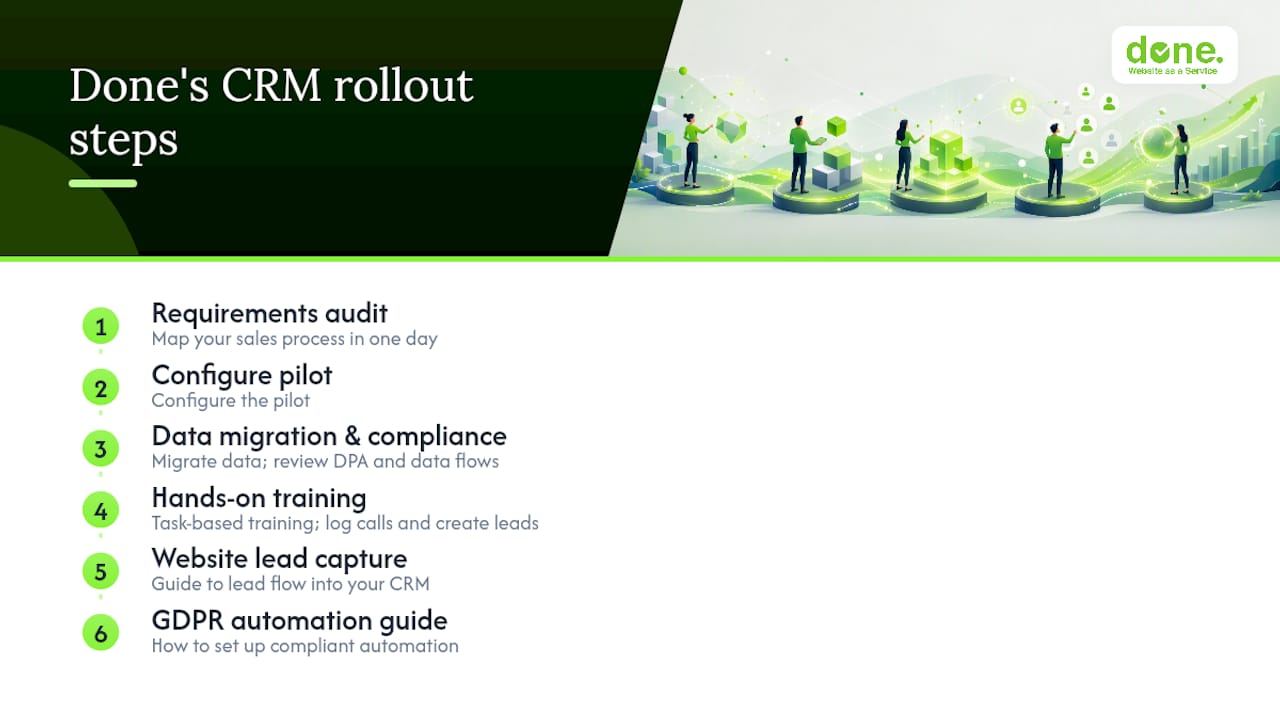
Done runs a short requirements audit before recommending anything, because we’d rather spend a day mapping your sales process than sell you a tool that doesn’t fit it. From there, we configure the pilot, handle data migration from your spreadsheets or old system, and review the GDPR paperwork, DPA, hosting location, and data flows, so nothing gets signed blind. Training is hands-on and task-based, aimed at getting your team logging calls and creating leads within the first week, not memorising a feature list.
If your CRM rollout also depends on stronger lead capture from your website, our digital marketing workflow guidance covers how leads should actually flow into the system you choose. And if GDPR-compliant automation is the sticking point, our guide to compliant automation for SMEs walks through exactly what a compliant setup looks like.
Get in touch through Done’s website to book a short requirements call before your next vendor demo.
Frequently asked questions
What is the fastest way to start CRM pasirinkimas smulkiai įmonei?
Map your sales process on paper first, then book two demos from different categories, sales-first and all-in-one, and score them against the same checklist.
Do small businesses need a free CRM or a paid one?
Freemium tiers work for testing and very small teams, but most small businesses outgrow free plans within a year once automation or reporting needs grow.
Is on-premise CRM ever the right choice for a small company?
Rarely, unless you operate in a sector with strict local data hosting requirements and already have IT staff to maintain it.
How long does a typical CRM pilot take?
Two to four weeks with two power users and one automated workflow is realistic, followed by migration and training over the following month.
What GDPR documents should a CRM vendor provide?
A signed data processing agreement, a list of sub-processors, confirmation of hosting location, and a clear data deletion process.
Sources
- Data protection — GDPR guidance for business — Europa
- Kaip išsirinkti CRM programinę įrangą verslui (Mundobytes)