

Install vLLM in Minutes and Tune PagedAttention for 2–4x Throughput
September 9, 2026
Slack’s built-in AI gives teams fast, contextual summaries, searchable answers grounded in company data, and agents that can act directly from a channel. The main surfaces are Slackbot, native Slack AI features, and Agentforce agents that reason across connected data. What you get depends heavily on your plan and your admin’s settings, so the honest answer is: powerful, but not automatically switched on for everyone.
TL;DR:
- Access to advanced Slack AI features depends on your plan tier, with Enterprise+ unlocking the most comprehensive capabilities, including enterprise search and connected app AI answers.
- Using Slack agents or marketplace apps involves careful permission review, especially for sensitive data, and should be restricted to specific channels and use cases.
- Grounding AI answers in your company’s own data reduces hallucination risks but requires governance, prompt templates, and human review for quality and safety.
- Effective Slack AI adoption relies on a structured approach, including an audit, targeted pilot, clear rules for team prompts, and measuring actual time savings and answer accuracy.
- Self-service is suitable for simple use cases like meeting summaries, but complex or sensitive projects benefit from expert assistance to ensure security and proper configuration.
Table of Contents
- What can Slack + AI actually do for your team?
- Which Slack plan unlocks which AI features?
- How do agents and Marketplace apps extend Slack’s AI?
- What team practices make Slack AI actually useful?
- Is Slack AI safe for sensitive company data?
- How should you run a Slack AI pilot?
- When should you self-serve versus bring in a consultant?
- How Done helps Luxembourg teams roll out Slack AI properly
- Sources
What can Slack + AI actually do for your team?
Slack’s AI features fall into four practical buckets: summarising, searching, drafting, and translating. Each one solves a specific daily annoyance rather than promising some abstract productivity boost.
Conversation and file summarisation condenses a busy channel or a long thread into a few sentences. Someone back from holiday can catch up quickly on a project channel in under a minute, instead of scrolling through a large backlog.
Enterprise search and AI answers let people ask a question in plain language and get a response pulled from messages, files, and connected apps, with sources cited so you can check the original. Slack documents this as grounded in your organisation’s own data, which matters because a generic AI answer with no source is close to useless in a work setting.
Slackbot now goes beyond reminders. It can help draft a message, prep a summary before a meeting, or trigger an action in a connected app, depending on what’s installed.
Where teams actually save time:
- A sales team turns a client thread into a follow-up email draft in seconds rather than rereading the whole exchange.
- A support lead gets an AI answer citing the exact ticket and file that solved a similar issue last month.
- A manager returns from a week off and reads one summary instead of three channels’ worth of backlog.
Slack describes this grounding in company data as a way to reduce hallucination risk compared with generic public models, because the AI answers from what your team actually wrote, not from the open internet.
Which Slack plan unlocks which AI features?
Not every workspace has access to the same tools, and this catches out a lot of teams who assume “Slack AI” is one single thing.
Slack’s own documentation lays out a tiered pattern across Pro, Business+, and Enterprise+:
- Pro plans typically get the basics: huddle notes and simple message-level assistance.
- Business+ adds broader Slack AI features such as channel and thread summarisation.
- Enterprise+ unlocks enterprise search and AI answers across connected apps, plus the strongest admin governance.
Before you promise anything to your team, check three things. First, confirm your actual plan tier in workspace settings, not what you remember signing up for two years ago. Second, check which AI features an admin has toggled on. Third, if you’re unsure whether your contract includes a feature, ask your account executive directly rather than guessing from a help article.
How do agents and Marketplace apps extend Slack’s AI?
Slack’s own summaries and search cover a lot, but agents go further by taking action, not just answering questions.
Agentforce, Slack’s agent framework, lets organisations build or deploy AI agents that reason across connected data and suggest or take actions inside Slack, such as updating a record or triggering a workflow. There are broadly three kinds of agent worth knowing about:
- Built-in agents that come with Slack AI and handle summaries, search, and drafting out of the box.
- Custom-built agents your team or a developer configures for a specific internal process.
- Third-party agents, installed from the Slack Marketplace, that connect Slack to an external AI model or tool.
Installing a third-party AI tool, such as the ChatGPT app in Slack, works through the Marketplace and typically asks for admin approval plus specific OAuth scopes covering what it can read and post. Review those scopes before approving, not after.
For technical teams building custom agents, Slack exposes developer APIs and the Model Context Protocol (MCP), a standard way for an agent to discover and use external tools securely. Worth knowing exists, even if your team never touches it directly.

What team practices make Slack AI actually useful?
The single biggest gap we see with clients isn’t the technology. It’s teams switching on a feature with no shared rules for using it, so three people write three different prompt styles and get three different quality levels of answer.
A shared prompt library fixes most of this fast. Keep it in a pinned channel or a dedicated document, with templates for the tasks people repeat weekly: meeting recap, ticket triage summary, or a first-draft client reply.
The workflows that benefit most from Slack AI:
- Meeting notes, turned into a summary and action list straight after a huddle.
- Async recaps, so remote team members don’t need to read every message to stay current.
- Ticket triage, where AI answers surface the likely fix before a human even opens the ticket.
- Content drafts, giving a marketing or support writer a starting point rather than a faster marketing content draft rather than a blank box.
Set one governance rule from day one: a human reviews anything AI drafts before it reaches a client or goes into a decision. AI answers are grounded in your data, but grounded doesn’t mean infallible.
Pro Tip: Give your prompt library an owner. A library nobody updates after month one turns stale fast, and stale prompts produce mediocre summaries.
Is Slack AI safe for sensitive company data?
This is the question every operations lead should ask before enabling anything, and the answer is more reassuring than most teams expect, provided you check the settings.
Slack’s own security position states that AI respects existing workspace permissions: an agent or AI answer cannot surface content a given user couldn’t already see. That single fact solves a lot of the fear around “will AI leak something to the wrong person.”
Still, a checklist matters:
- Review Marketplace app scopes before approval; don’t accept broad permissions by default.
- Restrict file summarisation in channels holding contracts, HR data, or client financials, if your compliance posture demands it.
- Keep a log of which apps and agents are active and who approved them.
- Apply data minimisation: connect an agent only to the specific channel or app it needs, not your whole workspace.
For GDPR-conscious teams, Slack states that it does not train its large language models on customer data, which is a meaningful distinction from consumer AI tools that may use your inputs for training. That claim doesn’t replace your own vendor contract review, but it’s a reasonable starting point. Our guide on AI storage privacy for SMBs covers the wider data minimisation steps worth pairing with this.
How should you run a Slack AI pilot?
A messy rollout is the single most common reason teams abandon Slack AI within a month. A tight pilot avoids that.
- Audit first. Map which channels, files, and existing app integrations you have, then pick one high-value use case, such as ticket triage or meeting recaps, rather than trying everything at once.
- Configure deliberately. Set admin controls before you invite anyone in, install only the apps the pilot needs, and scope permissions tightly rather than broadly.
- Run a four-week pilot. Train the pilot group, give them the prompt library from day one, and track weekly adoption, not just at the end.
- Measure and decide. Look at adoption rate, time saved on the specific task, answer accuracy, and how much human review each output still needs before you scale to more channels.
The teams we’ve seen adopt this well started small, on purpose, and only added integrations once the pilot showed clean results.
When should you self-serve versus bring in a consultant?
Self-serving makes sense when your use case is genuinely simple: a small team wants better meeting summaries, and you already have an admin comfortable installing apps and reviewing permission scopes. That’s a Tuesday afternoon project, not a project plan.
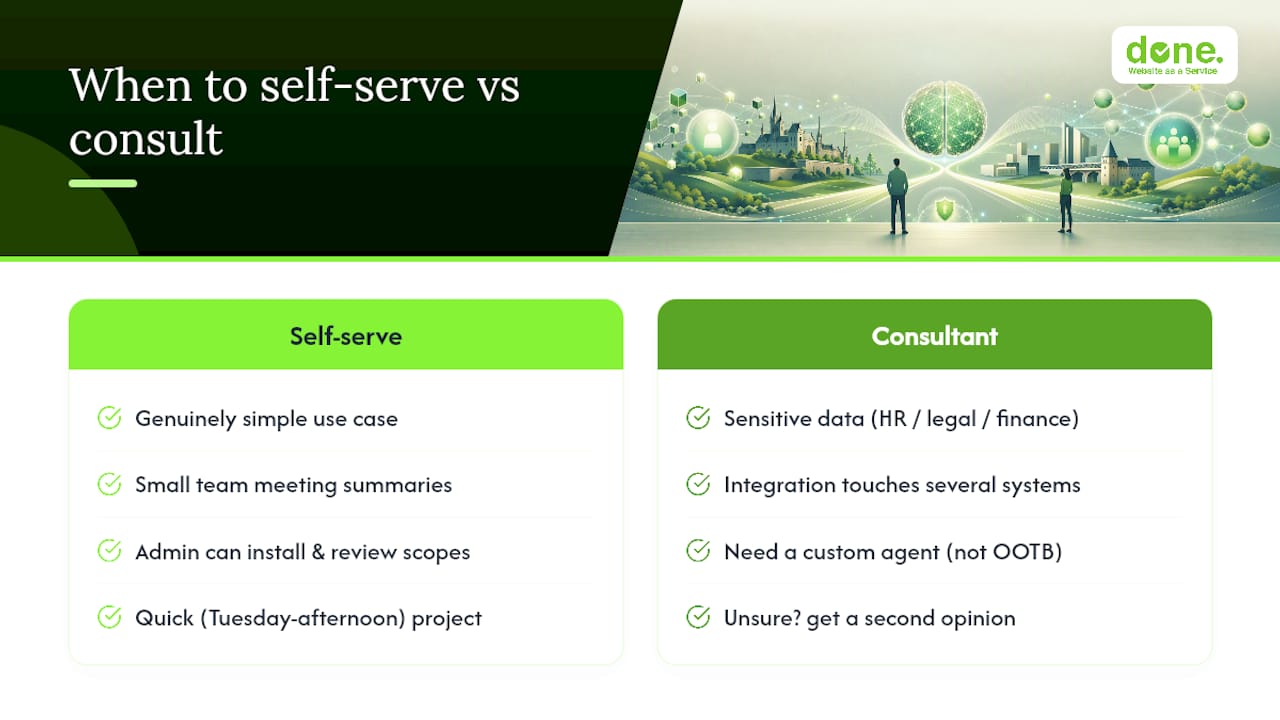
Bring in outside help when any of three things are true: the data involved is sensitive (HR, legal, financial), the integration touches several systems at once, or you want a custom agent rather than an out-of-the-box feature. Those situations reward experience, because the failure mode isn’t “it doesn’t work,” it’s “it works, quietly, in a way that exposes something it shouldn’t.”
If you’re unsure which category you fall into, that uncertainty is itself the answer: get a second opinion before flipping the switch, not after.
— Thomas
How Done helps Luxembourg teams roll out Slack AI properly
A practical approach to a Slack AI rollout includes a structured audit, a scoped pilot, and properly configured admin settings before anyone accesses sensitive data.
We run this the same way we approach any AI implementation project for SMBs: audit first, pilot small, measure honestly. That means mapping your channels and integrations, setting GDPR-aware admin controls, training your team on a working prompt library, and reviewing outcomes against real adoption numbers rather than vendor promises. Our AI strategy consulting for SMEs work follows this same audit to implementation approach, whether the project is Slack, a knowledge base assistant, or a private AI deployment for a regulated sector.
If you want a second opinion on your Slack rollout, or a hand running the four week pilot properly, get in touch with Done and we’ll tell you honestly whether you need us or not.